TL;DR Article Summary
- Three variables decide my evaluation: what it costs, how deep the booking rules go, and what it connects to.
- The pricing model matters more than the headline rate. Per-user billing charges for every employee whether they book or not, so cost climbs with headcount. Per-space and per-resource models (Skedda, Archie, Eden, Anny, Clearooms, Tactic) track your desk count instead, which is the number that actually stays flat in a hybrid office.
- The rules engine is where platforms genuinely separate. Most tools let you block a desk. Few let you express a real policy: quotas per group, role-based advance windows, eligibility by department, and approval workflows. If your attendance policy has any structure, verify the engine can express it before the demo.
- There is no single winner, only a best fit. Skedda leads on booking-rule depth and per-space pricing, Envoy on visitor management and integrations, Microsoft Places for fully M365-licensed organizations, OfficeSpace for move management, Officely and Dibsido at the budget end. Price the add-ons before you compare, because visitor management, analytics, SSO, and floor plan updates are paywalled more often than not.
- What to watch: Visitor management is a separately priced add-on at nearly every vendor here, ranging from $99/month flat to $329/location/month.
Move over, office cubicles. In 2026, workplaces are taking a more modern approach, introducing shared desks to align with flexible working habits. Hybrid work broke the assumption that everyone needs to be physically in the office everyday and the idea that every employee has a permanent desk.
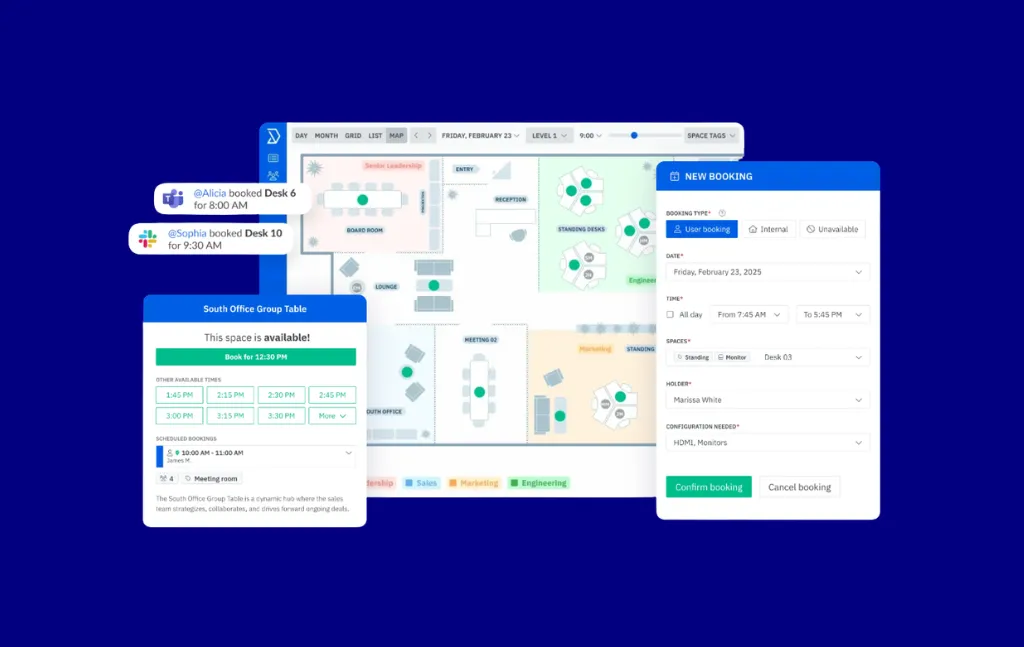
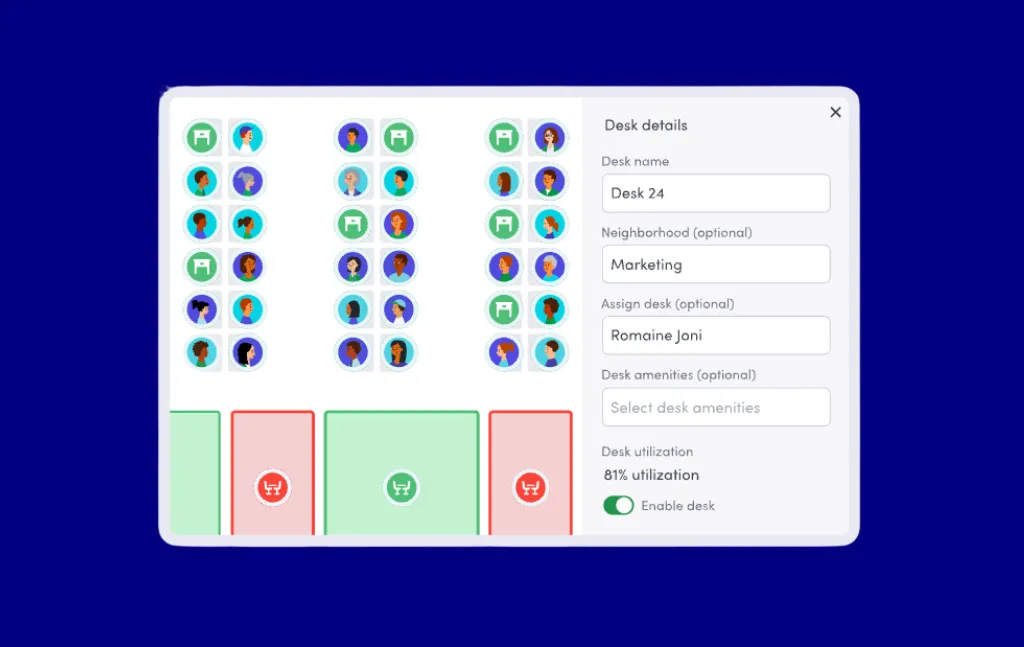
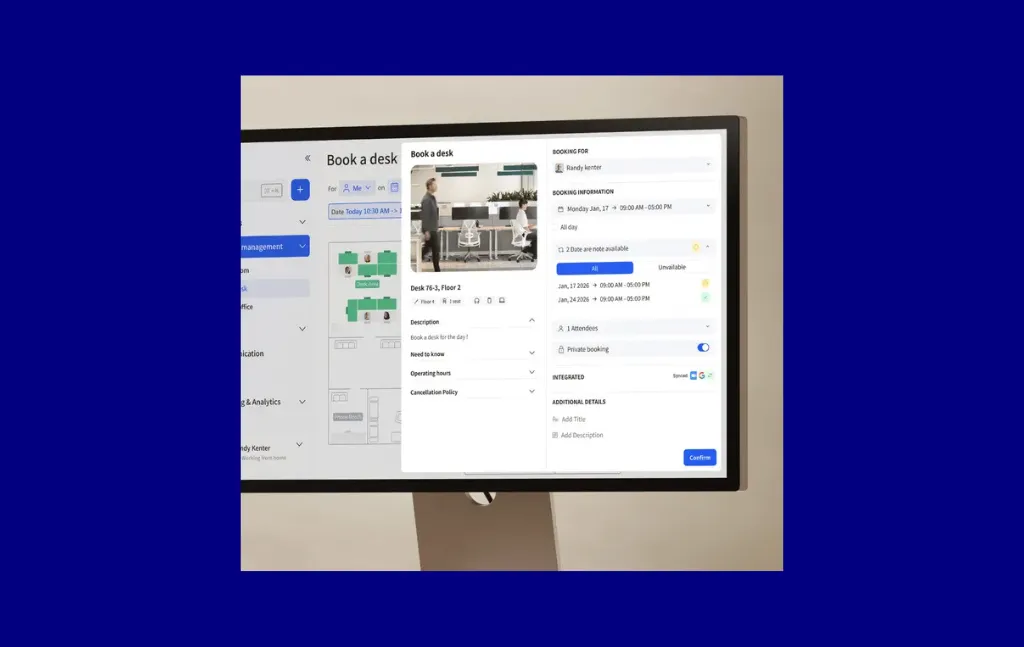
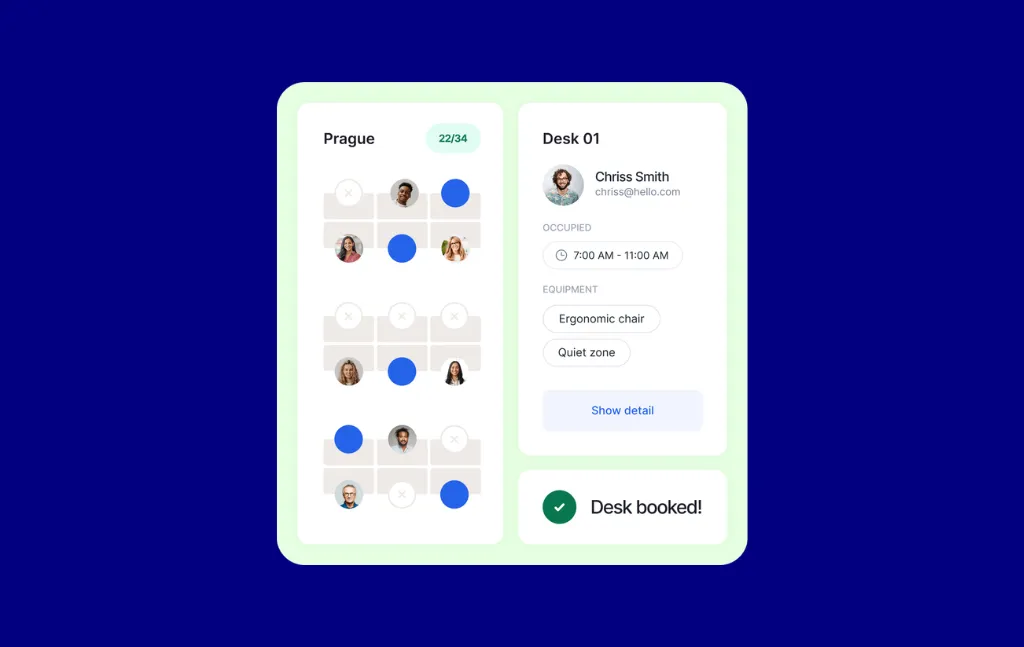
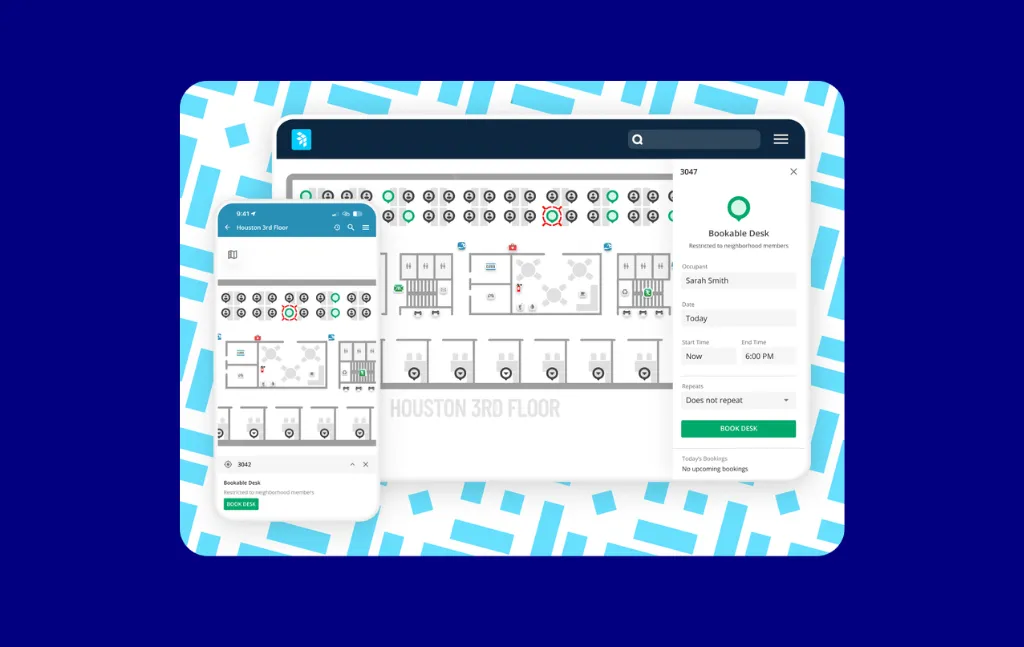
That’s where desk booking software comes in. Desk booking software lets employees reserve a workspace in advance. Most platforms present availability on an interactive floor plan, so booking is a matter of clicking an open seat rather than reading a spreadsheet.
When attendance varies by day and by team, assigned seating wastes real estate and shared seating creates conflict. Booking software makes shared seating work without a person in the middle arbitrating it.
In this guide, I compare 24 popular desk booking software platforms on the three variables that actually decide the outcome of a desk booking software evaluation: what the costs are, how deep the bookings rules go, and what the tool connects to. Let’s dive in.
Shortlist of the Best Desk Booking Software
The 24 platforms below, ranked by desk and room flexibility, booking rules, price, and features, each with the scenario it genuinely fits best.
- Skedda – Best desk booking software overall
- Envoy – Best for visitor management
- OfficeSpace – Best for IWMS needs
- Archie – Best for per-resource pricing
- OfficeRnD – Best for combined coworking and hybrid management
- Kadence – Best for Slack-native teams
- Condeco – Best for Power BI integration
- Microsoft Places – Best for organizations already fully licensed on Microsoft 365
- deskbird – Best for SMBs selling office coordination
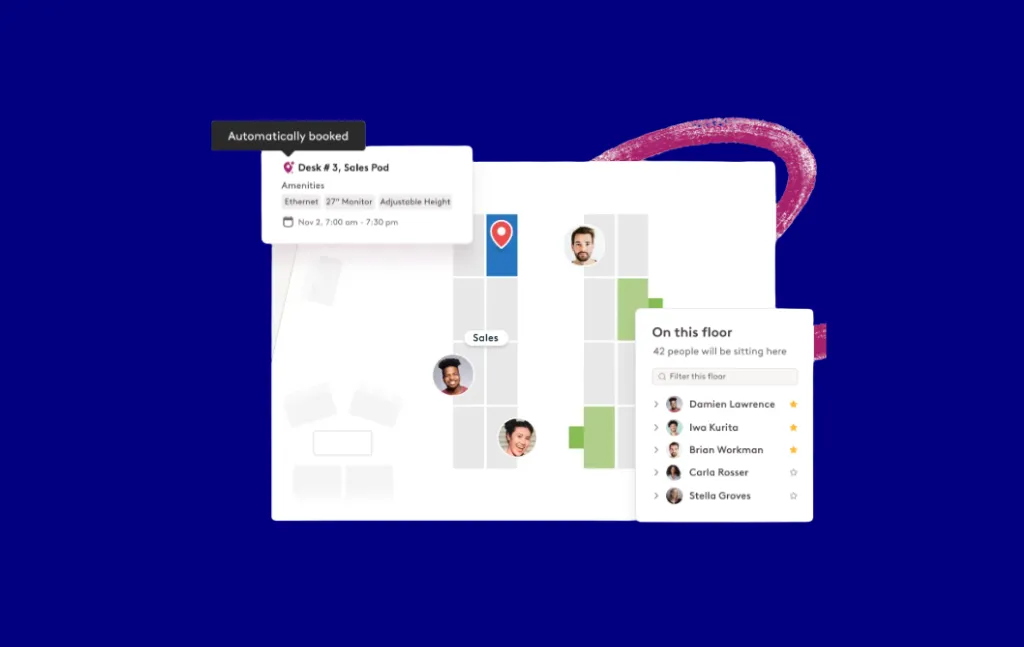
- Robin – Best for enterprise analytics
- WorkInSync – Best for bundled employee services at enterprise scale
- Tribeloo – Best for ease of use and onboarding
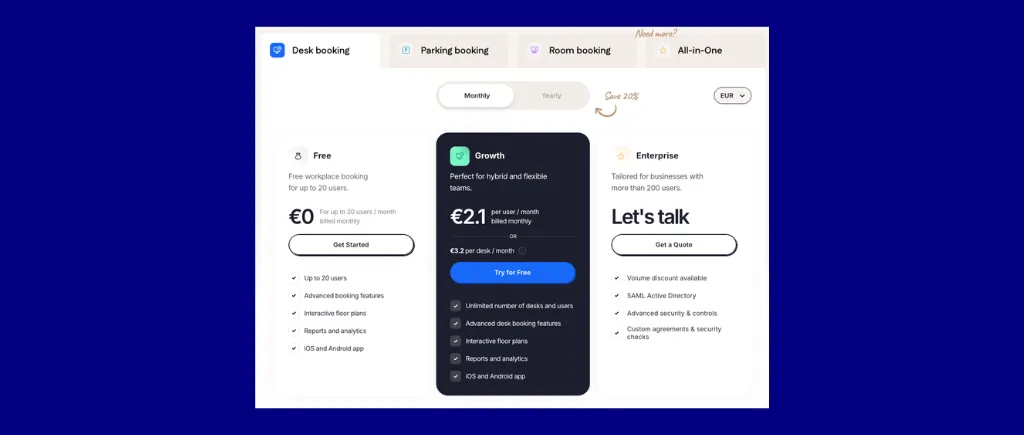
- Dibsido – Best for cost-sensitive small business
- Officely – Best for zero-friction Slack and Teams adoption
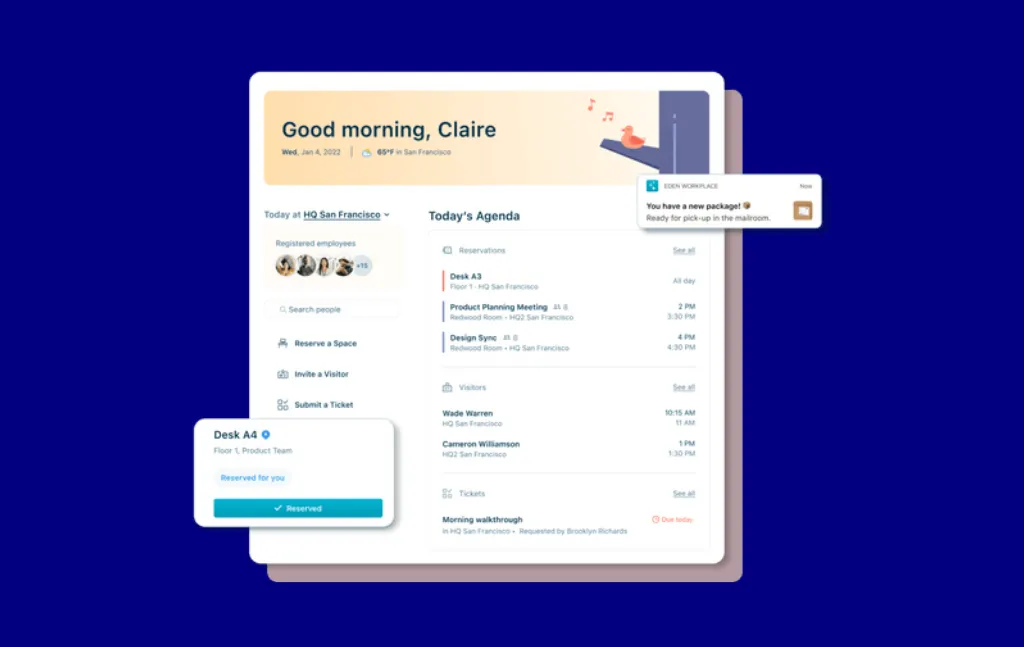
- Eden – Best for internal ticketing
- Clearooms – Best for transparent per-desk pricing with no contract
- Ronspot – Best for fair allocation of contested space
- anny – Best for monetizing your resource bookings
- Whatspot – Best for small offices and schools on a per-spot budget
- Tactic – Best for mid-size teams on a per-space budget
- Waldo by MOFFI – Best for Microsoft-only Teams deployments
- Floor Plan Mapper – Best for flat-pricing needs
- Hybrid Hero – Best for combined desk booking and HR
- YAROOMS – Best for AI booking assistant
Why Do You Need Desk Booking Software?
Here’s the truth behind the numbers: Attendance mandates are rising, real estate portfolios are flat or shrinking, and desk booking software is the solution to manage that gap.
According to JLL’s GLobal Occupancy Planning Benchmark Report 2026, which draws on 84 organizations representing 716 million square feet, global office utilization has risen to 56%, up from 54% in 2025 and 29% in 2024. That is still short of the pre-pandemic 61%, and it means roughly four in ten desks sit empty on a given day. The same report found that 62% of organizations now require a fixed number of in-office days, up from 49% a year earlier.
CBRE’s 2026 Americans Office Occupier Sentiment Survey puts a finer point on it: 89% of employers now require at least three days of attendance, up from 78% in 2025, while actual average attendance sits at 2.9 days against a 3.2-day target. Among companies that do plan to shrink their footprint, 67% cite reduced space needs from hybrid work as the primary driver. Desk booking software is the operational tool that makes that reduction possible without sacrificing employee experience.
Key Features to Look For
Interactive floor plans. A live map beats a list. Employees should see what is free, who is sitting where, and what each desk offers before they commit. Check whether you can edit the map yourself or whether every layout change requires a support ticket, because offices get rearranged more often than vendors assume.
A booking rules engine. This is where platforms separate. Basic tools let you block a desk. Deeper tools let you say: engineering can book the third floor; managers can book 14 days in advance, while everyone else gets 5 days; nobody can hold more than 3 days a week; and Friday bookings require approval. If your attendance policy has any structure at all, verify the rules engine can express it before the demo.
Two-way calendar sync. Bookings should appear in Microsoft Outlook or Google Calendar, and calendar changes should flow back. One-way sync produces ghost bookings, which quietly destroy the accuracy of every utilization report you will run afterward.
Occupancy tracking. Bookings tell you what people intended. Occupancy tells you what they did. Wi-Fi sensing, QR code check-in, badge data, or IP detection all work; what matters is that unclaimed desks auto-release so a no-show does not lock a seat all day.
Utilization analytics. At minimum: utilization by space and time, peak day patterns, and no-show rates. This is the output that justifies the next real estate decision, so check whether analytics sit in the base plan or behind a higher tier. Several vendors here paywall them.
Teams, Google, or Slack embedding. Adoption follows the path of least resistance. If employees can book from the tool they already have open, they book. If booking requires a separate app and a separate login, a meaningful share of them will not bother.
Identity and HR integration. SSO through SAML, provisioning through SCIM, and ideally a link to your HR system so people who leave the company lose access automatically. Ask whether these are included or sold as an add-on, because the answer varies widely.
AI features in desk booking software, honestly assessed
Vendors are increasingly marketing AI on their platforms. However, not all are major product updates. The reality splits into three tiers:
- Genuinely useful today: natural-language booking inside Teams or Slack, where an employee types “book me a desk near the design team for Thursday” and it works. Kadence, YAROOMS, Condeco, and OfficeSpace all ship a version of this.
- Useful but oversold: desk recommendations based on past bookings and teammate patterns. deskbird and Robin do this well. It’s pattern matching rather than reasoning, and it saves a few seconds rather than changing behavior.
- Mostly marketing: “AI-powered analytics” that describe a dashboard with threshold alerts. Ask the vendor what specific decision the AI made that a filter could not.
Methodology: How I Scored These Tools
I evaluated 24 platforms against six criteria, weighted by their practical impact on a mid-market hybrid workplace decision:
Evidence sources: Official product and pricing pages, public G2 and Capterra review signals, and direct product documentation. I prioritized primary product evidence over directory rankings and excluded loosely adjacent categories (appointment scheduling, client booking, general service scheduling).
Full Comparison Table
Estimates exclude optional add-ons (visitor management, sensors, hardware) unless noted.
The 24 Best Desk Booking Software, Reviewed
1. Skedda – Best Desk Booking Software Overall
Skedda is a workspace and space management platform for booking and administering desks, meeting rooms, parking, and other shared resources. It serves more than 8,000 organizations and 3 million users, with 72 million spaces booked to date.
Skedda is the #1 ranked product on G2 for Space Management (2026) and a G2 Leader in the category, with 2026 G2 awards for Best Support and Easiest Setup.
Skedda's real differentiation is how deep its booking rules go, controlling who can book what, when, and under what conditions, at a tier where most other platforms on this list offer very shallow customization. It’s not a full IWMS, but it’s not a light booking system either. I think of Skedda as giving “as much policy control as an enterprise system, without the enterprise implementation.”
Who Skedda is for, and why it earns the top spot
Skedda is a good fit for mid-market organizations with 100 to 2,000 employees that need granular control over how desks and rooms are booked—by department, role, time window, and quota—without sacrificing the interactive, user-friendly experience employees crave.
Skedda is a strong fit for someone who manages hybrid offices running a structured attendance policy with different rules for different groups. For example, two days a week in the office, engineering on the third floor, or managers can book further ahead than everyone else. This is accomplished through Skedda’s in-depth rules-and-roles engine, which includes Quotas, booking windows, advance booking limits, buffers, and eligibility rules.
Skedda is also great for higher education, government, and other high-user, moderate-space environments where per-user pricing generally costs more than per-space pricing.
With both the Utilization and Occupancy Insights Dashboard, you can see data on space usage and office attendance. This is indispensable for organizations that need utilization data credible enough to support a lease decision.
Unlike most competitors, Skedda lets you define a space however you want. Desks and rooms are just the start. Labs, equipment, parking, lockers, vehicles, EV chargers: if it can be booked, Skedda can handle it.
Skedda includes its most advanced capabilities on its Premier tier, which includes SCIM, approvals, issue reporting, and higher booking rule limits. Many other desk booking platforms put similar functionality behind a quote-only tier or a paid add-on.
The bottom line is, Skedda is the right choice when your evaluation centers on booking-rule depth, space analytics, and a user experience that encourages rapid adoption. Buy it when policy enforcement and utilization data are the job.

Core desk booking features
- Interactive Floor Plans with live availability and colleague avatars. We build them for you in about 48 hours and edits are free.
- Rules and roles engine: Quotas by time usage or booking count, including a cap on concurrent bookings, which is the one that stops a person holding five desks. Plus Booking Conditions by space, day, time, duration, and user tag, configurable booking windows, buffers, and eligibility rules.
- Booking Requests and Approvals with a central pending queue and automatic notification on decision (Premier).
- Assigned Spaces for dedicated, non-bookable desks and offices, designated with a pin to tell them apart from bookable spaces (Premier).
- Neighborhoods for named team zones on your office map.
- Occupancy Tracking through office Wifi connection, achieved through Skedda’s Companion App, mobile app, or browser activity, with auto check-in and auto-release of unclaimed bookings.
- Seven check-in methods, all audit-logged: automatic (Wi-Fi), web, mobile, email link, QR at the space, and Teams.
- Utilization Reports for booking trends by space, day, time, user, and team, with export capabilities and up to seven years of retention on Premier.
- Custom Fields and Notification Rules. Fields booking forms appear conditionally by space or tag, and rules email any address based on field inputs. Book a large room, declare twelve attendees, catering gets notified.
- Two-way calendar sync with Microsoft 365 and Google Workspace, plus a one-way option. If both sides book the same slot at the same instant, Skedda wins and the calendar booking is removed.
- Integrations: Microsoft Teams, Slack, Zoom, Webex, ServiceNow, Google Sheets, Logitech Tap Scheduler, Kisi for booking-linked door access through Zapier, and SAML SSO plus SCIM via Microsoft Entra ID and Okta.
- Tablet Displays for meeting rooms with on-demand check-in and booking functionality.
- Visitor Management as a paid add-on featuring guest invites, kiosk check-in, visit categorization, visit history, and package delivery management.
Pricing overview
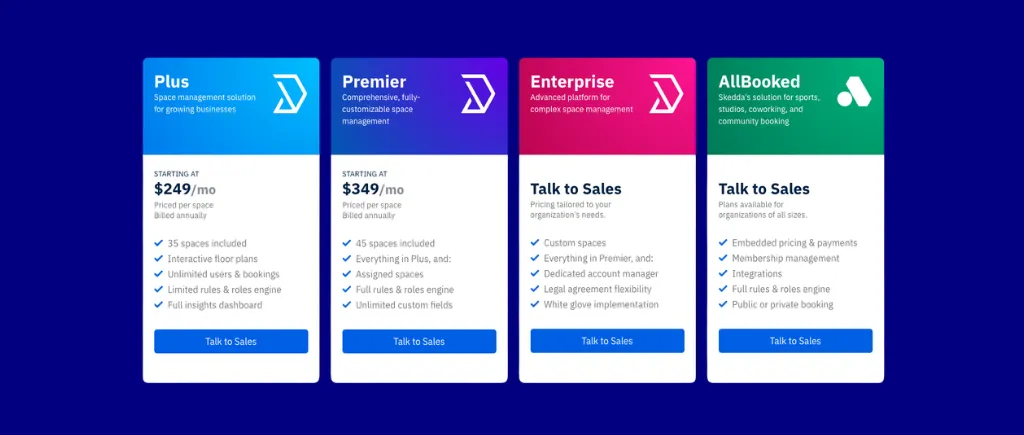
Skedda prices per space rather than per user. A space is any bookable item: a desk, a room, a parking spot, a locker, a piece of equipment. Users are unlimited on every plan.
Tip: budget for Premier, not Plus. Most of what makes Skedda worth choosing over a cheaper option lives there, and if you have any identity requirements or want approvals, Premier is a more suitable plan for you.

Pros
- Skedda's rules engine is built to scale. Set quotas, concurrent-booking caps, conditions by space, user tag, and duration, role-based time windows, buffers, and approvals once, and they kick-in across all applicable spaces, no applying governance logic space by space.
- Book spaces directly in Microsoft Teams with Skedda’s native Teams app.
- 2-way sync with your external calendar. Resource bookings in Outlook and Google reflect in Skedda, and vice versa.
- Directory changes propagate to booking rights automatically. Groups in your IdP map directly to user tags in Skedda via SCIM. That means any user-tag based rules you set up in Skedda will automatically apply to new users provisioned into the system.
- Per-space pricing with unlimited users. Cost follows your space count, not your headcount. In hybrid environments with more people than space, this is frequently decisive.
- Occupancy signals back up bookings, with passive Wifi detection via Skedda’s Companion App verifying physical office presence beyond a surface-level reservation. These presence signals even fuel automated actions like booking check-in, making the workday go a little smoother.
- Floor plans are built for you in about 48 hours, and changes are free.
- Assigned and bookable inventory live on one map, so the plan reflects the actual office.
- Notification Rules route requests automatically, which is a workflow capability that is uncommon at this price.
- SOC 2 Type II Certified, and GDPR compliant.

Cons
- Centralized multi-venue management is limited. Each venue you set up in Skedda essentially exists as its own entity, only connected by an aggregated reporting dashboard for admins. But for user management, streamlined user access, and space management, multi-site deployments are tricky to handle.
- Assigned Spaces are static. They are a pin tied to a user. Several platforms here automatically return an assigned desk to the pool when the owner does not check in or marks themselves remote. We do not, so capacity stranded by assigned seating stays stranded.
- Visitor Management is $99 a month on top of your plan.
- No natural-language AI booking. Four platforms in this guide let an employee type a request into Teams or Slack and have it book. We do not. If that is a requirement rather than a preference, consider Kadence or YAROOMS.
- No HRIS aggregator. Provisioning runs through SCIM and SAML, and SCIM covers Microsoft Entra ID and Okta only. There is no direct Workday, BambooHR, or ADP connector the way some competitors offer.
- Zapier is outbound only. Nothing writes into Skedda through third-party automation, which is the honest ceiling on custom workflow claims. Our Kisi door integration runs through Zapier rather than natively, and needs a paid Zapier plan plus the Integrations Pack.
- Custom BI reporting means exporting. The Insights dashboard covers most needs well, but if your analytics team wants to build their own dashboards, they will be working from exports or will need to connect to Skedda’s new API for external access to booking data.

2. Envoy – Best for Visitor Management
Envoy is a physical security and visitor management company that sells desk booking as one module of a platform. It started as a visitor management for SMB tech offices, with early customers including Airbnb, Pandora, GoPro, and Tesla. Visitor management is still the flagship. Since then, the company has added four additional paid product lines: Reservations (the desk and room booking module), Deliveries, Digital Signage, and Emergency Notifications, which became a standalone product in 2025 with anomaly detection and a centralized command center.
Who is Envoy best for, and why it made the list
Envoy wins with regulated and visitor-heavy industries: defense and aerospace, pharmaceuticals and biotech, manufacturing, healthcare, data centers, and government. If your compliance requirement involves badge printing, legal document signing, evacuation workflows, emergency alerting, and access control integration from one vendor under one security review, Envoy is a good pick.
Its visitor management is genuinely best in class: high volume, multi-location, enterprise-ready, with custom check-in flows, photo capture, a virtual front desk, and document signing and storage. Reviewers credit it with removing the need for a front-desk receptionist.
The integration roster is also the deepest here by a wide margin, at more than a hundred named connectors spanning access control, identity, communications, sensors, and automation platforms.
Where I would steer someone away from Envoy: booking-only use cases, single or low site counts, and any mid-market buyer whose actual pain is space governance rather than physical security.

Core desk booking features
- Calendar-native booking from Google Calendar or Outlook, so employees reserve desks, rooms, and parking without leaving the tool they already have open.
- Schedule Page for selecting the days you will be in and reserving a spot, which can auto-attach to a desk booking, plus visibility into colleague schedules.
- Auto-release on missed check-in, triggered via mobile, iPad kiosk, QR code, or passive Wi-Fi.
- Geolocation auto check-in requiring no user action.
- Walk-up room booking from a self-service tablet.
- Self-serve map upload. Upload your own PNG or JPEG and edit neighborhood location and coloring directly, with no vendor ticket.
- Bulk desk edits by drag selection: move desks, add amenities, or change neighborhood status across a whole region in one action.
- Points of Interest, letting you add searchable items such as fire extinguishers and AEDs to the map without regenerating the floor plan image.
- Dynamic Workplace Insights, applying AI to forecast attendance, recommend right-sizing of desks and rooms, and surface utilization trends from passive data signals.
- Customizable analytics widgets and charts.
- Multi-site management from a single admin dashboard.
- Visitor management with badge printing, custom check-in flows, photo capture, virtual front desk, and legal document signing and storage. A free tier exists.
- Emergency Notifications with multi-channel alerts, anomaly detection, and a centralized command center.
- Integrations across access control (Kisi, Openpath, Brivo, Genea, Rhombus), identity (Okta, Microsoft Entra ID), communications (Slack, Microsoft Teams), occupancy sensors, and automation (Zapier, IFTTT, Power Automate, Pipedream), plus an open API and webhooks.
Pricing overview
You choose a platform first, either Premium or Enterprise, and then add modules. The platform plan is a prerequisite, not an alternative.
Update: Envoy moved from per-user to resource-based pricing in 2025, so older comparisons quoting per-user rates are out of date.

Pros
- Visitor management is the best in this guide. High volume, multi-location, badge printing, custom check-in flows, photo capture, virtual front desk, document signing and storage, and a free tier.
- The deepest integration roster in the category at over a hundred named connectors, spanning access control, identity, communications, sensors, and automation platforms, plus an open API.
- Calendar-native booking means employees never leave Outlook or Google Calendar.
- Self-serve mapping is better than most. Upload your own image and edit neighborhoods directly, with bulk desk edits by drag selection.
- Points of Interest for safety assets without regenerating the floor plan.
- Dynamic Workplace Insights forecasts attendance and recommends right-sizing from passive signals, which is a better data foundation than booking-derived analytics.
- Emergency Notifications as a full product, with anomaly detection and a command center.
- Multi-site management from one admin dashboard.
Cons
- The booking rules engine is thin. Envoy's policy logic is built on reservation flows applied at the location level. There are no quotas, no booking conditions, no buffer times, and no approval workflows.
- Auto check-in does not apply to rooms. Automatic check-in covers presence and desk reservations only; room check-in must be manually confirmed.
- Wi-Fi auto check-in has an identity prerequisite. Users must first sign in through Okta or Microsoft Entra ID while on the office network before Envoy can record presence and fire automatic check-in.
- Booking views are map-based only. There is no spreadsheet-style day, month, or grid view. For an admin who thinks in lists and wants to scan a week of bookings as a table, that is real daily friction.
- The platform fee is mandatory and unpublished, and an implementation fee applies on top.
- Add-on units are per location, so cost compounds with site count rather than with usage.
- SCIM and Custom Admin Roles require the Enterprise platform plan.
- No conditional notification routing. There is no way to send booking details or service requests to specific email addresses based on space and custom field values.
- Workplace Ticketing exists, but issues are not tied to spaces.
- Hardware reliability shows up repeatedly in reviews. Recurring Capterra feedback reports intermittent iPad and badge-printer connectivity drops requiring manual restarts.

3. OfficeSpace – Best for IWMS Needs
OfficeSpace was founded in 2006 by Shamim Sahba and Ashkon Sabet, headquartered in Alpharetta, Georgia, with operations across the United States, Canada, and Costa Rica. It was built for corporate real estate and facilities management, and desk booking was added on later. That’s why move management, stack planning, and asset depreciation tracking are mature, while the calendar integration is not.
Who is OfficeSpace best for, and why it made the list
OfficeSpace handles multi-venue management better than most platforms in this guide. It is the strongest product here for a real facilities operation: move coordination, scenario forecasting, stack planning, and an asset directory with depreciation tracking and scheduled maintenance checks. Stack planning specifically, meaning allocating departments to floors across a portfolio over a multi-year horizon, is something that a true IWMS does well versus booking-first products.
I recommend OfficeSpace if you have this trifecta: a facilities manager, a move calendar, and a portfolio. There’s a need for somebody to track furniture and somebody to own the lease renewal, and booking is only one of nine things the software has to do.
I don’t recommend OfficeSpace if your main goal is to have desks and rooms booked well, with reporting you can act on. That’s because you’ll end up paying for software with too much of what you won’t use: configuring space-planning modules you never open and trying to find where the attendance reporting is, while fighting a calendar sync defect every day if you run Google Workspace.

Core desk booking features
- Desk and meeting room booking, with interactive floor plans and a floor plan editor that supports stack and move planning.
- Multi-venue management through a zoomed-out map view across the portfolio.
- Desk Lending, which lets employees release their assigned space for booking while they are out of office.
- Universal Presence API, which handles occupancy automation across mixed sensor hardware rather than tying you to one vendor's devices.
- Wi-Fi occupancy tracking, utilization reports, and team attendance metrics.
- AI Canvas for layout generation and scenario planning, plus Ossie, the natural-language assistant that handles booking, insights, colleague lookup, and product support questions. The support use case is less common than the booking one and more useful than it sounds.
- Visitor Desk Booking, meaning you can book a desk specifically for a guest.
- Presence Indicator, where employees choose whether to share in-office status publicly or privately. The privacy toggle matters more than it appears in works-council and GDPR-sensitive environments.
- Facility Requests, routing maintenance tickets from users directly to facilities managers.
- Wayfinding and colleague search, plus asset management with depreciation tracking and maintenance scheduling.
- Integrations with Microsoft 365, Google Workspace, Slack, and Microsoft Teams.
Pricing overview
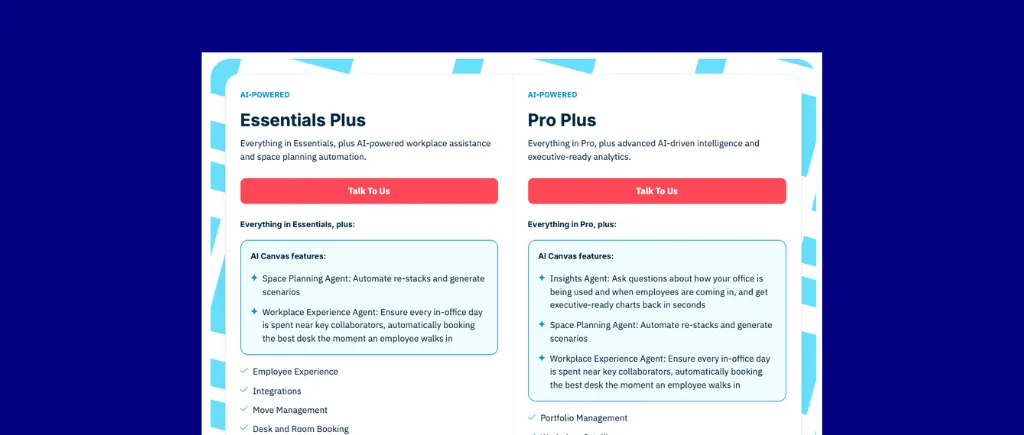
There is no pricing published. The plans are Essential Plus and Pro Plus, both contact-sales. Here are some items to keep in mind as you decide which plan best fits your needs:

Pros
- The best multi-venue portfolio management in this guide, with a single view across sites.
- Space planning, move management, and stack planning that nothing else here attempts. Scenario forecasting across a portfolio over time is a corporate real estate discipline, not a booking feature, and OfficeSpace has had twenty years to build it.
- Asset management with depreciation tracking and scheduled maintenance checks. Explicitly outside Skedda's scope, and we say so in our own documentation.
- The Universal Presence API is the strongest answer to sensor lock-in in the category. Sensor-agnostic occupancy across mixed hardware fleets solves a real problem for anyone with an inherited estate.
- Desk Lending recovers assigned capacity automatically, which is the single most underrated capability in this whole category and one that most assigned-seating organizations badly need.
- Presence Indicator gives employees a privacy choice, which is a meaningful design decision in European deployments and not one every vendor makes.
- Visitor Desk Booking and native Facility Requests, both of which follow from being a facilities product rather than a booking product.
Cons
- Google Calendar sync blocks the entire day for a desk booking.
- No published pricing at any tier, no published plan feature details, and a one-time onboarding fee on every plan with implementation charged on top.
- Utilization reporting, Wi-Fi occupancy tracking, and attendance metrics have historically sat on the top tier. If you are buying workplace software specifically to report on return-to-office compliance, find out before you sign whether the attendance reporting is in the plan you were quoted.
- Space management is bundled into even the entry tier. Smaller organizations pay for complexity they will not use, and the worst cost is administrative: more configuration surface, more onboarding, more places a setup goes wrong.
- The booking rules engine is undocumented.
- Booking is the least modern part of the product. Reviewers consistently name Google sync, complexity for smaller organizations, and pricing opacity as their criticisms, and those same three are the most common reasons customers leave.
- Longer implementation and a steeper admin learning curve than lighter tools in this category.

4. Archie – Best for Per-Resource Pricing
Archie is a workspace management platform out of Montreal, founded in 2016. It covers desk booking, meeting room scheduling, visitor management, and coworking operations, delivered through three apps: Archie Mobile, Archie Rooms, and Archie Visitors.
They position themselves as a flexible all-in-one solution for hybrid offices. When I read their help center, I see a product whose depth is in multi-location coworking management. The support documentation, the feature investment, and the module structure all point in that direction.
Who Archie is best for, and why it made the list
Archie is a good fit for coworking operators. If you run flexible workspaces and you need memberships, billing, payments, a community feed, messaging, and events alongside booking, Archie is built for you.
Archie also works with hybrid offices that have variable headcount and straightforward needs. It means desks and rooms, one or a small number of sites, no attendance mandate with structure to it, and no requirement to prove who was actually in the building. Under those conditions Archie is a good product and its per-resource pricing is attractive. However, the math turns against you if you need a lot of meeting rooms.
I would not recommend Archie if you need to enforce an attendance policy with different rules for different groups, since their booking rules depth doesn’t allow for that. If you need more detailed utilization data to make real estate decisions, I would also steer away from Archie.

Core desk booking features
- Interactive floor plan with a coworker finder and amenity filtering, so people can locate their team or find a desk with the setup they need.
- Colleague search showing in-office or remote status and seating location.
- “My Workweek” view for comparing your in-office days against your colleagues'.
- Room tablets with live availability.
- QR-code auto-release of unclaimed desks.
- Full Microsoft Teams embedding, meaning complete booking inside Teams rather than a notification bridge.
- Two-way Google Calendar and Outlook sync.
- Slack bot for one-click booking and release.
- Microsoft 365 and Entra ID directory sync for automatic user provisioning and deprovisioning.
- Native door access integrations including Kisi and Salto, with entitlement-based permanent access rather than booking-scoped unlocks.
- Visitor management, available standalone: badge printing, photo capture, e-signature, recurring visits, evacuation workflows.
- Scheduled reports that auto-generate and email to chosen recipients, with customizable columns.
- Coworking module covering payments, memberships, community feed, messaging, and events.
- SSO, SCIM, and brand customization.
Pricing overview
Per resource, with modules purchased independently.
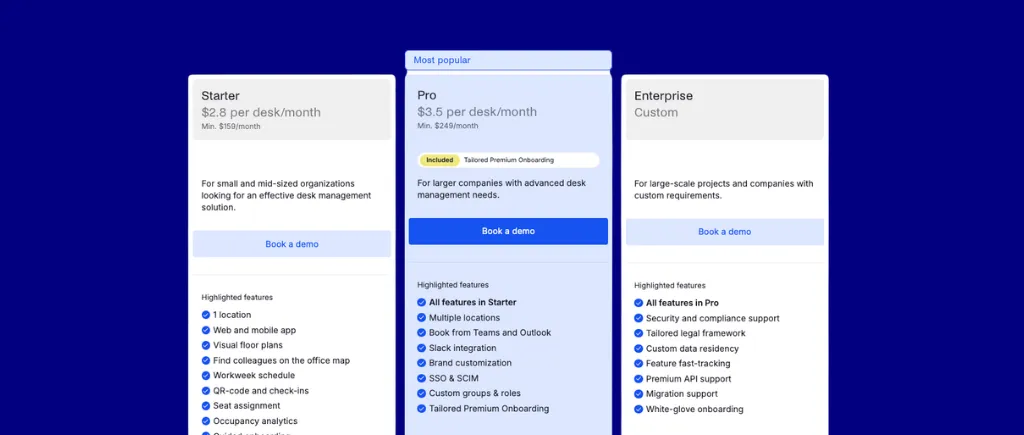
Add-ons include a wayfinding kiosk, API and webhooks, a branded mobile app, and additional onboarding sessions. Visitor management runs $109 per month on Starter or $185 per location per month on Pro. The coworking module is a separate $257 per month. SSO and SCIM come with Pro onboarding.

Pros
- Per-resource pricing. Your cost tracks bookable inventory, not headcount, which is the right shape for a hybrid office.
- Genuinely fast setup and strong adoption, consistently reported by reviewers.
- Native Kisi and Salto door access with entitlement-based permanent access, which is a better model than booking-scoped unlocks for coworking and member-style environments.
- Full Microsoft Teams embedding plus a Slack bot for one-click booking and release.
- Coworker finder, amenity filtering, colleague search, and My Workweek, which together do more for voluntary attendance than most attendance features do.
- Microsoft 365 directory sync provisions and deprovisions users automatically.
- Visitor management is fuller than most add-on modules, including badge printing, e-signature, and evacuation workflows, and it can stand alone.
- Scheduled auto-generating reports with customizable columns, emailed to whoever needs them.
- A complete coworking suite if that is your business.
Cons
- The rules engine cannot segment by user type or apply policy across the organization. Rules are configured space by space. There are no quotas, no granular booking conditions, and no configurable booking windows.
- There is no passive occupancy tracking. Outside a DoorFlow badge-swipe integration, Archie cannot detect presence, which means no automatic check-in when someone arrives on site. Every check-in is a deliberate user action.
- Admin roles cannot be scoped to selected user groups, spaces, or neighborhoods, so you cannot give a floor lead control of their own floor and nothing else.
- Booking approvals appear to be a per-space toggle rather than a workflow with a queue, a dashboard, and notifications.
- Rooms cost three to four times desks, which inverts the value proposition for any room-heavy portfolio.
- The analytics dashboard requires manual digging, with no pre-built summary view. The scheduled export is good; the interactive analysis is not.

5. OfficeRnD – Best for Combined Coworking and Hybrid Management
OfficeRnD is first a coworking operator platform and second a corporate hybrid product. It was founded in 2015 in Sofia, Bulgaria, as coworking and community management software built to automate administrative work for flexible workspaces. It now reports more than 2,000 workspaces across 60-plus countries, with offices in Atlanta, London, Melbourne, and Sofia.
There are two products: OfficeRnD Flex is the coworking operator platform. OfficeRnD Workplace, formerly called Hybrid, is the corporate hybrid-office product.
Who is OfficeRnD best for, and why it made the list
I recommend OfficeRnD for smaller organizations. Their Start plan covers up to 150 users at $99 a month on annual billing, and for a single-site office that needs no SSO or multi-location management, it is a genuinely strong deal.
The other clear fit is an organization that wants coworking-grade administration alongside corporate booking, because OfficeRnD sells two products on a shared foundation, and the membership, billing, and admin tooling that heritage produces runs deeper than a workplace-only product needs.
Where I would steer someone away is the middle of the market. The $99 figure everyone quotes is the annual base fee for a tier capped at 150 users, before a single desk or room is counted. A realistic mid-market configuration will land at a much higher rate.

Core desk booking features
- Desk and meeting room booking with interactive floor plans and real-time availability.
- Team neighborhoods, included from the entry Start tier, which is rare.
- Desk analytics on Start, with deeper reporting above it.
- Automatic Wi-Fi check-in, available from the Professional tier.
- QR code bookings, from Professional.
- Multi-location management, from Professional.
- Digital signage, from Professional.
- Single Sign-On and automated user provisioning, from Professional.
- Customizable admin roles, at Enterprise only.
- Audit trail, at Enterprise only.
- Multi-tenant SSO, API access, and webhooks, at Enterprise only.
- Visitor Hub, a paid add-on available on every tier, covering badge printing, delivery management, host notifications, and pre-registration.
- Integrations with Microsoft 365, Google Workspace, Microsoft Teams, and Slack from the Start tier, with SSO providers arriving at Professional.
- Coworking capability through the companion Flex product, covering memberships, billing, and community management.
Pricing overview
OfficeRnD is not flat-rate. It is a three-component model: a base platform fee, a charge per bookable resource, and a charge per meeting room.
Annual billing carries a 25% discount. Visitor Hub is a paid add-on on every tier, and the price is not published. Implementation beyond the included guidance costs extra, and there is a minimum commitment tied to a floor on bookable resources and rooms per tier.

Pros
- The entry tier is genuinely cheap for a small office. $99 a month on annual billing for up to 150 users, with desk and room booking, desk analytics, neighborhoods, and Microsoft, Google, and Slack integrations included.
- Team neighborhoods on the entry plan, where several competitors reserve zone features for higher tiers.
- Coworking heritage produces real administrative depth. Membership, billing, and community tooling that a workplace-only product does not need to build, available through the companion product if you want it.
- Both products sit on a shared foundation, so an organization running both flexible and corporate space can operate them together rather than integrating two vendors.
- Ease of use is consistently praised, along with the Microsoft Teams and Outlook integrations, and reviewers say desk and room booking is accessible for administrators and employees alike.
- Automatic Wi-Fi check-in from Professional, which puts passive presence detection within reach at a mid tier rather than only at enterprise level.
- An audit trail exists, which is more than several platforms in this guide can say, even though it sits at Enterprise.
- Four billing currencies and volume discounts, which is helpful for internationally distributed buyers.
Cons
- The pricing model is hard to forecast. Base fee plus per resource plus per room means three independent scaling behaviors.
- The Start plan withholds what most mid-market buyers need. No SSO, no multi-location management, no digital signage, and a hard 150-user ceiling. Most organizations of any size land on Professional, where the base fee is four times higher before any units are counted.
- The audit trail and customizable admin roles are Enterprise-only. These are the two capabilities that let an administrator investigate a booking dispute and delegate control of a single floor to a site lead, and both sit behind a quote.
- Visitor Hub is a paid add-on on every tier with no published price.
- Support response times are the most consistent complaint in reviews. Reviewers report support being difficult to reach, with waits of two to three days or longer. Priority handling requires Professional; phone support and a dedicated success manager require Enterprise.
- The interface is a common criticism. The product is functional and full-featured, and the cost of that is a less simple interface with more menus, more settings, and more places to configure things.
- Some reviewers report customization limits, wanting more flexibility than the product allows.
- The occupancy detection method is undescribed. Automatic Wi-Fi check-in exists from Professional, which implies network-based presence detection, but I couldn’t find how it works or how accurate it is.
6. Kadence – Best for Slack-Native Teams
Kadence was founded in 2013 as Chargifi, a startup selling portable phone-charging stations to cafés, restaurants, and workplaces. In 2022 they pivoted and relaunched as Kadence, a space booking platform for hybrid workplaces selling hybrid coordination to HR, with genuinely good AI chat booking and a deliberately shallow structural model underneath it.
Who is Kadence best for, and why it made the list
I recommend Kadence for organizations that are HR-led and distributed: people operations teams at hybrid-first companies who are trying to get colleagues to overlap in the office rather than trying to enforce a policy, and whose employees live in Slack or Microsoft Teams all day.
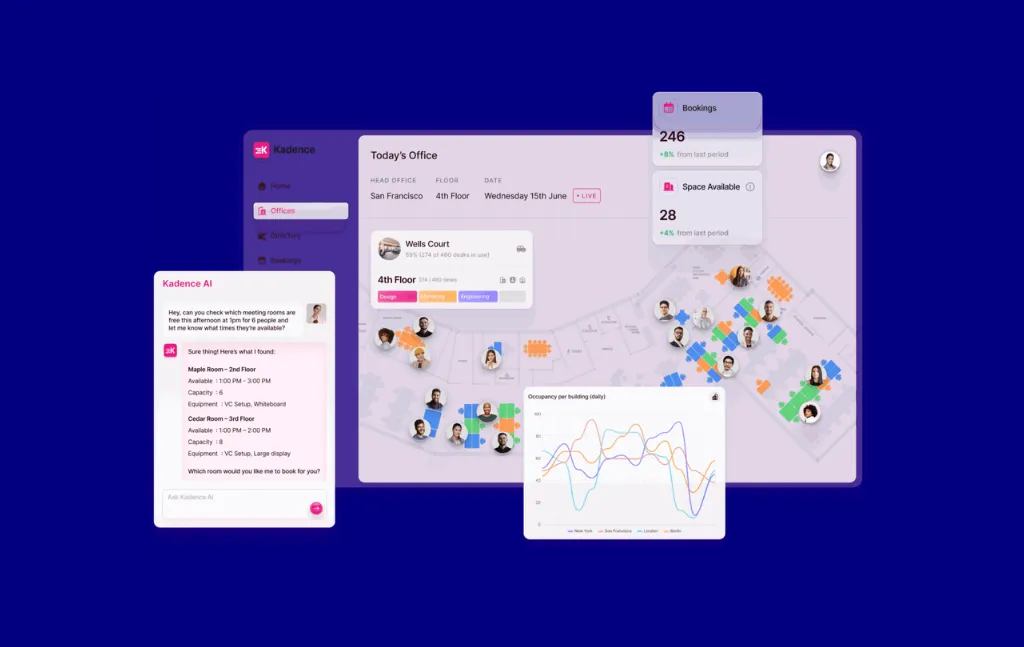
Kadence's own positioning is about coordinating people, space, and time, and the feature set follows: workplace announcements, office events, team schedules, an employee directory with working hours and typical in-office days.
The AI chat-to-book inside Slack and Microsoft Teams is among the better conversational implementations in this category, and it includes check-in via chat, which most conversational booking does not. Their Public API lets customers build custom check-in workflows that fire on a badge swipe or a Wi-Fi connection, and push booking data out to other systems.
Assigned Space Sharing is the most sophisticated model of its kind I have seen anywhere in this market as well. You can assign several named people to a single space with specific days allocated per person, and have it auto-release when nobody is using it.
I would not recommend Kadence for any organization enforcing a structured attendance policy, anyone booking resources that are not desks, rooms, pods, lockers, or parking, and any office that reconfigures its floor plan more than once a year.

Core desk booking features
- AI chat-to-book with natural language processing, integrated with Slack and Microsoft Teams, including check-in via chat.
- Public API for custom check-in workflows, allowing triggers on badge swipe or Wi-Fi connection, and export of booking data to other platforms.
- Assigned Space Sharing: assign multiple named people to one space with specific days allocated per person, with automatic release to general booking when nobody is using it.
- Multi-signal automated check-in combining mobile, calendar, and Wi-Fi presence to reduce ghost bookings.
- Office Neighborhoods for team zone assignment, with attendance rules.
- Multi-Venue Navigation, nesting floor plans under buildings so users browse a directory of buildings across the organization.
- Employee Directory with working-hour profiles and typical in-office days.
- Remote Working Status check-in, so people can signal working from home.
- Work order requests submitted directly in the app.
- Catering forms attached to specific bookings.
- Office events visible to employees, and workplace announcements sent company-wide from within the platform.
- Native Slack and Microsoft Teams apps carrying the full booking and coordination experience.
Pricing overview
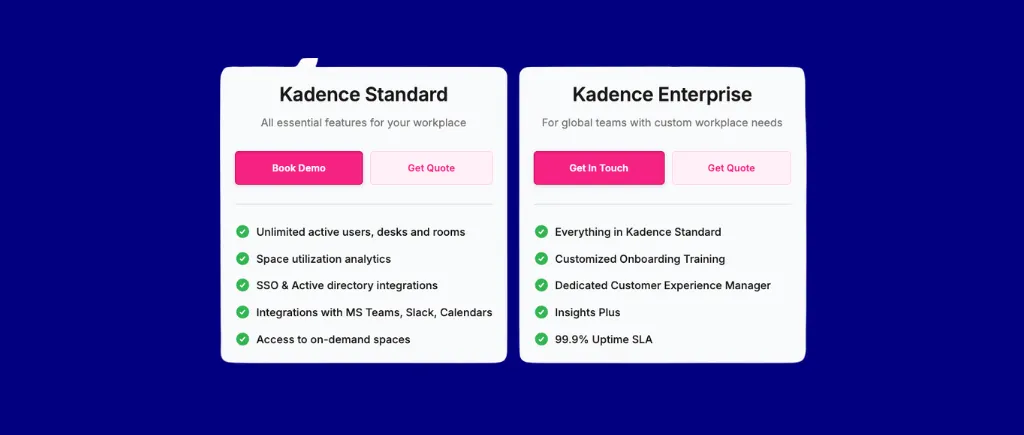
Kadence does not publish pricing. The plans are Kadence Standard and Kadence Enterprise, both contact-sales. The billing model is per user, specifically active users. Here are some items to keep in mind as you decide which plan best fits your needs:

Pros
- AI chat-to-book in Slack and Microsoft Teams, including check-in via chat. Genuinely one of the better conversational implementations in this category, and Skedda has no equivalent.
- A Public API that accepts inbound data, letting customers build custom check-in triggers on badge swipe or Wi-Fi connection.
- Assigned Space Sharing with per-person day allocation and auto-release.
- Active-user billing, so partially remote workforces are not billed at full headcount every month.
- Multi-signal automated check-in across mobile, calendar, and Wi-Fi presence, which is a stronger anti-ghost-booking mechanism than single-signal check-in.
- Multi-Venue Navigation with buildings and nested floor plans, which handles portfolio structure better than our independent-venue model.
- Office Neighborhoods with attendance rules, giving admins a zone-level policy lever.
- Strong coordination features for the HR buyer: employee directory with working hours, remote status, events, and announcements.
- Work order requests and catering forms attached to bookings, extending the product past pure reservation.
Cons
- Kadence has teams, not user tags. Here’s the difference: a tag can be the subject of a rule, and one person can hold several. A team is an organizational grouping that says who reports where; it is not designed to be the subject of an access expression, and a person generally belongs to only one. That means there’s limited ways you can build granular booking rules.
- Users cannot be assigned to rooms, which makes restricting room access by person or team difficult outside of neighborhoods. In practice this means you cannot easily limit the boardroom to the leadership team.
- Space types are a fixed preset library: desks, rooms, pods, lockers, and parking. There are no custom space types, which means you can’t set up anything outside the presets, like specific equipment you may need.
- No quotas, no granular booking conditions, and no configurable booking windows by user segment.
- $250 per floor plan upload. This is an ongoing cost for any organization that changes its layout.
- Out-of-the-box utilization reporting is thin. Custom reporting is Insights Plus, a paid add-on that also requires special support to configure. For a buyer whose reason for purchasing is utilization data, the reporting is neither included nor self-serve.
- White-glove onboarding is enterprise only. Everyone else self-serves.
- Pricing is not published at any tier, so you cannot qualify yourself on budget without a sales conversation.

7. Eptura Engage (formerly Condeco) – Best for Power BI Integration
Eptura Engage is an enterprise-grade room and desk booking platform serving 2,000+ global companies. Formerly Condeco, it was founded in London in 2005. In October 2022, it merged with iOffice and SpaceIQ to form Eptura, and followed by an absorption of Proxyclick for visitor management and ManagerPlus for asset and maintenance management. Engage is one product inside a five-company rollup.
Who is Eptura Engage best for, and why it made the list
I recommend Engage for genuinely large organizations with complex needs: five thousand employees and up, a multi-country portfolio, a mixed hardware estate accumulated over years, Microsoft standardized throughout, and a corporate real estate function that needs to filter utilization by country, region, office, floor, zone, and team.
Their multi-venue insights have the best dimensional depth in this category and for a global portfolio that is the right shape of reporting. Their hardware coverage is unmatched: badge swipe, proximity mobile, RFID card, six-digit PIN, room touch screen, and dedicated desk booking kiosks, plus room panels integrated with access badges and browser-based wayfinding displays. If you are retrofitting a large existing estate with mixed equipment, Engage is right for you.
Engage has quotas and booking windows. What it lacks is configurable depth: rules based on intervals, buffer times, user tags, and duration are all easier to express elsewhere.
I would not recommend Engage for use cases below enterprise scale, any organization on Google Workspace, any Slack-first culture, and any deployment where employee adoption is the binding constraint.
%20platform.webp)
Core desk booking features
- Working Status Mandates. Admins can mandate remote working days and set required in-office days per user, and a user cannot book a space while their status is set to remote. Most platforms constrain the booking. Engage constrains the person, modeling working status as state and deriving booking eligibility from it, which arguably works better for a large enterprise enforcing a uniform hybrid pattern.
- Multi-Venue Insights, filtering utilization and attendance metrics by country, region, office, floor, zone, team, and date range.
- Room booking screens integrated with access badges, showing meeting status and an availability schedule.
- Wayfinder, a browser-based TV display showing room lists, upcoming meetings, availability, and directions.
- Outlook Smart Calendar add-in that automatically rebooks an alternative room when a meeting moves, and notifies attendees, without the organizer hunting for a replacement.
- Teams chatbot for booking from chat, and an AI Copilot accepting natural-language queries for desks, rooms, and best collaboration days.
- Power BI templates for offline occupancy analysis.
- Occupancy sensor integrations with Relogix, Metrikus, and PointGrab.
- Broadest check-in coverage in this guide: badge swipe, proximity mobile, RFID card, six-digit PIN, room touch screen, and dedicated Desk Booking Kiosk hardware.
- Swap Meeting Spaces, letting you drag and drop a booked meeting between two open rooms.
- Service Booking for catering, IT, and event-related resources.
- Key Worker Roles, tagging employees as fire marshals, first aid responders, or mental health responders so colleagues can locate them.
- Colleague Finder for locating where someone is sitting.
Pricing overview
Engage does not publish pricing at any tier. The plans are Advanced and Power, both contact-sales. The model is per user. Annual subscription discounting is available, optional add-ons cost extra, and onboarding terms are not detailed publicly. There is no free trial, and an annual commitment is required.
%20pricing.webp)
Pros
- Multi-venue insight depth is the best in this category, filterable by country, region, office, floor, zone, team, and date.
- Hardware coverage is unmatched. Six check-in methods plus room panels tied to access badges and wayfinding displays.
- Working Status Mandates are the most enterprise-native RTO enforcement mechanism I have seen. Deriving booking eligibility from a person's declared work state, rather than reconstructing policy from booking rules, works well for uniform hybrid patterns.
- The Outlook Smart Calendar add-in auto-rebooks rooms when meetings move. Most platforms release the room and leave the organizer to start over.
- It has an actual rules engine. Quotas and booking windows are present, which puts Engage ahead of most of this guide on policy capability.
- AI Copilot and a Teams chatbot for natural-language queries and chat-based booking.
- Power BI templates feed occupancy data into the BI stack most Microsoft-standardized enterprises already run.
- Sensor integrations with three named occupancy vendors, giving a hardware path to presence data.
- Key Worker Roles and Service Booking, which are exactly the compliance and operations features large regulated enterprises ask for.
Cons
- The user experience is the most consistently criticized thing about this product. Reviewers describe the interface as clunky and non-intuitive, and report specific difficulty amending existing bookings. Complexities include three separate admin portals, bulk desk updates that require editing each desk individually with no multi-select, and a reporting module that does not support custom attributes.
- There is no true “seen on site” data outside sensors and booking check-ins. This is a meaningful architectural limit given the RTO positioning. Engage sells mandate enforcement, and its evidence for whether someone actually attended is either a manual check-in or purchased sensor hardware.
- No native Google Workspace integration.
- No Slack app.
- Room amenity signposting is poor. Clients frequently report booking rooms that turn out to be incompatible with their meeting type, because the room capability information is not clear enough at the point of booking.
- The rules engine has real gaps despite having quotas and windows. Rules based on intervals, buffer times, user tags, and duration are all harder to express than they should be. Engage can express a quota and a window, and struggles with “this group, these spaces, these durations, with this buffer.”
- Enabling the Microsoft 365 and Exchange add-in breaks moderation emails in some configurations, which negatively impacts rollout and adoption.
%20desk%20booking%20review.webp)
8. Microsoft Places – Best for Organizations Already Fully Licensed on Microsoft 365
Places is Microsoft’s hybrid work tool, focusing strongly on AI and team collaboration. The product puts hybrid coordination, desk booking, and space analytics inside the M365 stack rather than in a separate platform. It is not a product Microsoft sells. Unveiled in late 2022, Places has been generally available from mid-2025.
Who is Microsoft Places best for, and why it made the list
Places is specifically for the Microsoft 365 enterprise admin as it is bundled with the M365 suite. If your requirement is letting people see who is in and grab a meeting room, Places allows you to do that without having to buy anything additional.
Where Microsoft Places shine is in its adoptability and usability for people already in the M365 suite. Places live inside Outlook, Teams, and the M365 app, so booking happens in the calendar employees already use. Users can set their work location in Outlook, and Places shows who’s in, auto-detects office days via Wi-Fi, and cancels desk reservations when someone switches to “remote.”
Additionally, Places connects to Microsoft Copilot to help with a variety of room booking tasks, like “intelligent booking,” which suggests a desk-to-book based on where your team is sitting and on historical bookings.
I recommend Places for organizations that are fully Microsoft-licensed, on Exchange Online across the board, with desks that are interchangeable, nothing to manage beyond rooms and desks, no attendance policy with real structure to it, and an IT team with capacity to build the hierarchy.

Core desk booking features
- Work plans and workplace presence. Users set a work location in Outlook, and Places shows who is in.
- Automatic workplace check-in via corporate Wi-Fi or a supported peripheral. Passive, requiring no user action, and one of the better presence implementations in this guide.
- Room and workspace booking, plus desk assignment and individual desk booking with the right license.
- Auto-release of unoccupied rooms and desks.
- Places Explorer and Places Finder, giving map-based building, room, and desk exploration with photos, floor plans, audiovisual capability, and accessibility metadata. Both moved to core entitlement rather than Teams Premium as of April 2026.
- Places analytics compares declared work plans to actual attendance and lets teams set in-office cadences and measure adherence.
- A Places management portal with PowerShell and Microsoft Graph access.
- Copilot integration for what Microsoft calls intelligent booking, suggesting a desk based on where a user's team has historically sat.
Pricing overview
Core Places functionality is included with any Microsoft license that has Outlook and Teams calendar access. Here are the available licenses and their corresponding prices:
Individual desk booking, auto-release, and occupancy reports moved from a per-user Teams Premium model to a per-space model on April 1, 2026. One paid Shared Space license entitles you to three additional free Single Space licenses, so one paid license covers four slots, usable for individual desks or BYOD rooms. Rooms need no space license; you only pay if you want auto-release and occupancy reporting on them.

Pros
- Core booking, presence, and check-in cost nothing beyond Microsoft 365 licensing you already own.
- Genuinely native to Teams and Outlook. Booking happens in the calendar people already have open, presence appears where they already look, and there is no new app, no new login, and no adoption program.
- The analytics framing is sharp. Places compares declared work plans against actual attendance, and lets teams set in-office cadences and measure adherence against them.
- Automatic check-in over corporate Wi-Fi is passive presence detection that requires nothing from the user.
- Places Finder surfaces photos, floor plans, audiovisual capability, and accessibility metadata on rooms and desks. The accessibility data in particular is better than most.
- No new vendor, no procurement cycle, no security review, and no separate data processing agreement.
Cons
- There is no booking rules engine. No quotas, no eligibility rules by group, no role-based advance windows, no buffers, no approvals. If your attendance policy has any structure at all, Places has nowhere to put it.
- Rooms, desk pools, and desks only. Places is not built to manage parking, labs, lockers, equipment, vehicles, or any other shared resource.
- Exchange Online only. In hybrid Exchange environments, users with on-premises mailboxes cannot access the Places app, Places Finder, or work plans at all, and their work location changes never sync to colleagues. If you are mid-migration, this is disqualifying for part of your workforce and there is no workaround.
- Floor plan operations are an IT project. Setup and every subsequent change run through PowerShell, Microsoft Graph, and the management portal, and floor plans use the IMDF standard, which typically means engaging a Microsoft partner.
- License assignment to a desk takes 24 to 48 hours to take effect, and the documented workaround is toggling desk mode to Unavailable and back, which cancels every scheduled future booking on that desk.
- New Outlook is required for many features, and new Outlook is Windows and web only.
- AI booking now needs a Copilot license at $30 or $21 per user per month, so Quick Book costs more than it did under Teams Premium and is priced across your entire workforce.
- Most features depend on a fully configured hierarchy of buildings, floors, rooms, and desks, and there is no vendor-assisted floor plan service behind it.
- Analytics stop short of the retention and trend depth a lease decision needs.
9. deskbird – Best for SMBs Selling Office Coordination
deskbird is a desk and room booking platform designed for hybrid workplaces, serving SMB to mid-market organizations. It was founded in 2020 in St. Gallen, Switzerland, by two ex-BCG consultants who anticipated the shift to hybrid work. They position themselves as “the workplace management app that puts employees first,” emphasizing employee experience and office socialization over administrative control.
Who is deskbird best for, and why it made the list
I recommend deskbird for organizations that are HR-led and prioritize the employee experience and office socialization over administrative control.
The employee experience is the best in this guide for pure coordination, and because it is genuinely mobile-app-first in a category that is overwhelmingly web-first with a phone app attached.
The personal feed is the most coherent execution of the social-app pattern applied to workplace booking that I have seen anywhere: follow colleagues, see the week ahead, quick-book a favorite, get notified. Auto-Booking lets someone set weekly work preferences once and then stop thinking about booking entirely.
deskbird's policy compliance feature lets admins define hybrid policies and track adherence. It measures and reports to HR, but does not deny a booking that violates the policy the way a quota or a booking condition would.
I would not recommend deskbird for any deal where IT will be involved in the decision, any organization booking resources beyond standard desks and rooms, and any North American buyer who needs same-timezone support.

Core desk booking features
- Personal feed, letting users follow colleagues, view their week's bookings, quick-book favorited spaces, and receive notifications in one stream.
- Mobile-app-first architecture, where the mobile app is the primary product portal rather than a companion to a web application.
- Auto-Booking from weekly work preferences, so a user's favorite desk books itself according to the pattern they set.
- Week Planning, showing which colleagues are coming in and letting people signal their own plans to the team.
- AI desk recommendations based on past bookings and followed colleagues.
- Geofence-based automatic check-in, requiring no user action.
- Full desk and room booking inside Microsoft Teams, plus an Outlook add-in for calendar-based booking.
- Hybrid Office Policy Compliance, letting admins define hybrid policies and track employee adherence against them.
- Assigned Space Release, automatically returning an assigned desk to common use when its owner does not check in for the day.
- Office Functions, assigning public-facing health and safety roles including fire wardens, first aiders, evacuation helpers, and key holders.
- Office events posted by admins and visible on every employee's feed.
- Catering requests attached to events, and surfacing of health workers available in the building.
- HRIS integrations for syncing employee data. See the note in the cons about the scope of these.
Pricing overview
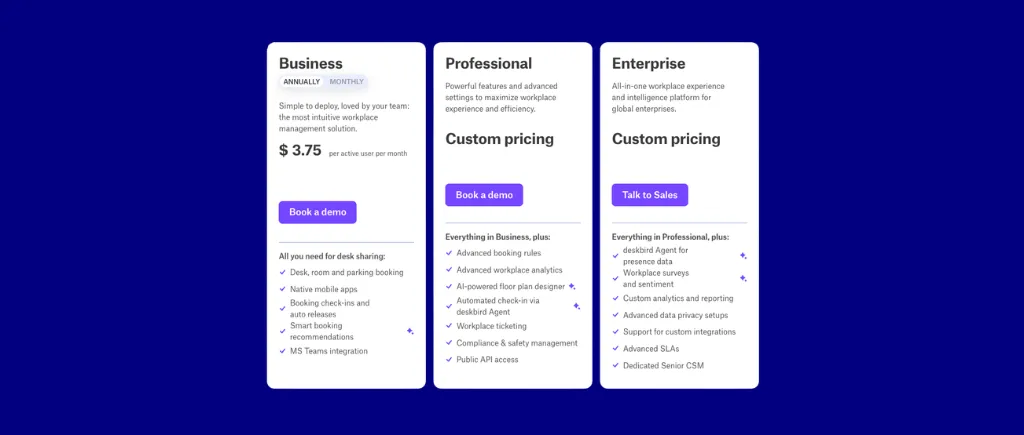
deskbird has three different plans priced per active user. Active-user billing means you pay for people who actually book in a given month rather than for headcount. For a partially remote workforce, that is better than flat per-user pricing.
The Business plan is $3.75 per active user per month, billed annually. Professional and Enterprise are custom-priced.
The costs that do not appear in a per-user comparison:
Annual contracts are required for Business and Professional pricing. The onboarding fee scales steeply. Visitor management at $150 per location per month is a per-location unit, so three sites is $5,400 a year, and that gap widens with every site you add. Identity features are an add-on rather than included.
Only Enterprise and Professional customers receive onboarding help. General support response runs one to two days; Enterprise gets two hours. A Business-tier customer is largely self-serve with multi-day support latency.

Pros
- The best employee experience in this guide for pure coordination. Personal feed, colleague following, week planning, quick-book favorites.
- Genuinely mobile-app-first.
- Auto-Booking from weekly preferences, so employees configure their pattern once and stop making a decision every week.
- Active-user billing, the fairer variant of per-user pricing, so you are not charged full headcount for a partially remote workforce.
- Geofence automatic check-in with no user action required.
- Full booking inside Microsoft Teams, plus an Outlook add-in, so booking lives where Microsoft-centric employees already work.
- Assigned Space Release, returning stranded assigned capacity to the pool on a no-show.
- Office Functions for safety roles.
Cons
- Recurring bookings are difficult to set up reliably for a regular hybrid schedule. This is the most-cited functional complaint in their reviews.
- SCIM, SAML, and HRIS sync sit behind a paid add-on outside enterprise plans, at roughly $0.50 per user per month, with SFTP and custom HRIS sync enterprise-only. Essential identity features being an add-on rather than included is a procurement friction point that will surface at security review.
- There is no way to close the office and prevent bookings on specific days for renovations, holidays, or shutdowns, according to reviewer reports.
- You cannot book whole areas, and you cannot create if-then relationship bookings between spaces. So a condition like “if the boardroom is booked, block the adjoining breakout” is not expressible.
- Preset space types, so labs, shared equipment, and specialty resources do not fit.
- Policy is tracked rather than enforced. No quotas, no booking conditions that deny, no approval workflows. If you have committed publicly to an attendance policy, deskbird will tell you who is complying butl not stop anyone who is not.
- Advance booking is capped at roughly ten days for standard users, which constrains forward planning.
- Support latency of one to two days outside Enterprise, with onboarding help only from Professional upward.

10. Robin – Best for Enterprise Analytics
Robin is an enterprise workplace operations platform founded in 2014 in Boston. It is widely deployed across large, complex hybrid organizations with 500 or more employees where at least a third use the office regularly.
Who is Robin best for, and why it made the list
I recommend Robin if you are managing five or more locations, want mature floor plan tooling with scenario planning, and have the budget to absorb a per-user model plus add-ons.
The AI Scheduling Agent is the most developed AI implementation in this guide. It handles meeting conflict resolution and reschedules, and when a meeting moves and loses its room, it proposes alternatives rather than simply releasing the room and leaving the organizer to start over. It does predictive and automatic desk booking from history, factoring in proximity to teammates a user has favorited, and it matches rooms to meeting size and amenity requirements.
For any organization that already runs badge access, Robin is a plus as it integrates with major access control companies so you can use badge data to measure real occupancy and expedite desk check-ins.
I don’t recommend Robin to mid-market buyers who need cost predictability, and anyone whose attendance policy requires quotas or buffer times.

Core desk booking features
- AI Scheduling Agent, covering meeting conflict resolution, reschedules, and alternatives for displaced meetings, plus predictive booking based on history, suggested desk booking, and automatic booking from past preferences.
- Workplace Dashboard, a fully customizable central admin hub bringing together attendance tracking, upcoming visits, deliveries, and service requests.
- Priority Desk Booking, a rules engine for managing booking priority across the organization.
- Scenario Planning, letting you create and share draft floor plans per floor with view-only access for stakeholders.
- Access control integration, using badge swipe data both to measure real occupancy and to expedite desk check-ins.
- Multi-signal automated check-in.
- Office Neighborhoods for team zone assignment.
- Meeting Services, an integrated system for tracking service requests tied to meetings, including catering and AV setup.
- Schedule and Team Views, letting users see their own and teammates' upcoming schedules, with the ability to favorite colleagues, which feeds the AI's proximity suggestions.
- Native Microsoft Teams and Slack integrations.
- Tablet booking for rooms, including check-in.
- Strong floor plan editor with a mature admin interface aimed at organizations running five or more locations.
Pricing overview
Robin does not publish pricing. The plans are Starter and Enterprise, both contact-sales.
The model is per user, with an extensive add-on list.
Education institutions receive reduced pricing.
Robin unbundles things most buyers assume are included: support, analytics, and floor plan maintenance. Combined with per-user billing, the effective cost frequently exceeds the entry quote by a wide margin, and the entry quote itself is not obtainable without a sales conversation. It means the number you model at the start of an evaluation and the number on your invoice can diverge substantially, so you should ask for the fully loaded figure early.

Pros
- The most developed AI in this guide. Conflict resolution, alternatives for displaced meetings, predictive and automatic booking from history, and room matching to meeting requirements.
- Badge-swipe occupancy measurement through access control integration, which is the most reliable presence signal available and better than our network inference for organizations already running badge access.
- Scenario Planning with shareable draft floor plans per floor, which is genuine space-planning capability.
- The Workplace Dashboard is well built, bringing attendance, visits, deliveries, and service requests into one customizable admin view.
- Priority Desk Booking gives you a real lever on contention.
- Mature floor plan editor and admin interface for organizations running five or more locations.
- Native Teams and Slack integrations with multi-signal automated check-in and Office Neighborhoods.
- Meeting Services ties catering and AV requests to bookings.
Cons
- No buffer times, no booking conditions, and no user quotas. If your policy is “nobody books more than three days a week” or “managers book fourteen days ahead and everyone else five,” Robin has no way to express that.
- Floor plan updates carry an additional cost, and turnaround is slow, with design changes taking significant time to appear in the account. For any organization that reconfigures space more than once a year this compounds into both a cost and an operational drag.
- Premium support is paywalled, and G2 reviewers frequently flag slow response times on standard support.
- Advanced analytics require a paid add-on. For a platform positioning on workplace operations intelligence, meaningful reporting sitting behind an additional purchase is worth knowing before you budget.
- Auto check-in can lag up to 45 minutes.
- Two-way calendar sync is incomplete: it does not pull virtual conferencing links. So a synced booking arrives without the Zoom or Teams join link, which is exactly the field most users need.
- Historical concerns about feature gating across tiers appear repeatedly in reviews. Ask which tier each capability you care about actually sits on.

11. WorkInSync – Best for Bundled Employee Services at Enterprise Scale
WorkInSync is the workplace product of MoveInSync, founded in 2009 in Bengaluru, India. MoveInSync's core business is employee transportation: home-to-office cabs, fixed-route shuttles, and corporate car rentals, with scheduling, routing optimization, real-time tracking, billing, and safety features. The company describes itself as the world's largest employee commute platform.
Who is WorkInSync best for, and why it made the list
I recommend WorkInSync if you’re running a large campus with an operating model that includes employer-provided transport, gated campus access, and formal attendance capture.
WorkInSync is a corporate commute platform that added desk booking, and its module list reflects that: cafeteria and meal booking, shuttle and airport transfers, parking management, Digipass QR entry with thermal scanning, attendance capture, and manager rostering. All of them are large-campus employee-operations features, and they are standard expectations in the Indian corporate market MoveInSync built for.
I don’t recommend WorkInSync for any organization below 250 employees and any Western mid-market office without transport and canteen operations, since most of the platform’s feature breadth lies there.

Core desk booking features
- Desk and meeting room booking with conflict management and interactive floor plans.
- Multi-model check-in, included from the entry tier, which is generous placement compared with most of this guide.
- Digipass, a QR-based contactless entry credential paired with thermal scanning, letting employees enter the office without touching surfaces. Genuinely useful for organizations retrofitting access control without badge infrastructure.
- Voice-enabled desk booking, and NLP booking at the Enterprise tier.
- Auto desk allocation (Enterprise), assigning desks algorithmically rather than requiring employees to choose. Well suited to high-density campus operations.
- Parking management with spot reservation (Professional).
- Cafeteria and meal booking, letting employees find seats and pre-book meals (Professional).
- Employee commute and transport booking, including shuttles and airport transfers.
- Visitor management (Professional).
- Attendance capture and manager rostering.
- Internal wayfinding, service requests, and room catering (Enterprise).
- Occupancy sensor integration (Enterprise), with hardware billed separately.
- Floor kiosks and meeting room kiosks.
- Real-time space utilization analytics, with custom dashboards at Enterprise.
- Integrations with Outlook, Google Calendar, Microsoft Teams, and Slack, plus Active Directory sync at Professional and SCIM at Enterprise.
Pricing overview
Per user, per month, with no separate charge for admin users. Hardware such as sensors and displays is billed separately.
Custom plans and discounts are available on request. Calendar sync is one-way until Professional. Standard lists “calendar integration;” Professional lists “bi-directional calendar sync.” So the entry tier writes to the calendar and does not read back. Governance is entirely Enterprise-tier. Role-based access controls, custom roles and permissions, SCIM, and SAML 2.0 SSO all sit at the top. Standard does include some form of SSO and Enterprise separately lists SAML 2.0, which implies the Standard version is simpler federation. Microsoft Teams and Slack require Professional. If your adoption plan depends on booking inside Teams, the entry tier does not deliver it.

Pros
- The broadest employee-service coverage in this guide by a wide margin, spanning commute, cafeteria, parking, attendance, and visitor management alongside desks and rooms.
- Published per-user tiers, which most platforms operating at this scale do not offer.
- Digipass contactless entry with thermal scanning, which supports secure access without badge hardware.
- Voice-enabled booking and NLP booking.
- Auto desk allocation, assigning desks algorithmically rather than requiring a choice. Well matched to dense campus environments.
- Multi-model check-in in the entry tier, which several competitors reserve for higher plans.
- No charge for admin users, so administrative headcount does not inflate the bill.
- Strong multi-site and APAC presence, which matters if your portfolio is not confined to North America and Europe.
Cons
- Integration coverage is the most-cited weakness in reviews. Reviewers report that it does not integrate fully with some HRMS and admin dashboard systems.
- The 250-employee minimum is a structural floor. WorkInSync will not sell to a small office.
- All governance sits on the Enterprise tier. Role-based access controls, custom roles and permissions, SCIM, and SAML 2.0 are top-tier only.
- Teams and Slack require Professional, and bi-directional calendar sync also requires Professional, so the entry tier is thinner than it first reads.
- Reported reliability issues around seat availability updates and cancellation processes appear in reviews.
- The ease-of-use verdict is genuinely split. Most reviewers describe WorkInSync as very easy to navigate without training, with a clean interface that does not feel overwhelming.The mobile app carries noticeably fewer features than the desktop version.
- Hardware is billed separately at every tier, so sensors, kiosks, and displays are additional capital or subscription cost on top of the per-user rate.
- Breadth is a cost as well as a benefit. For a Western mid-market office with no company shuttle, no subsidized canteen, and no campus gate, most of the module list is configuration surface you will never use but will still administer around.
12. Tribeloo – Best for Ease of Use and Onboarding
Tribeloo is a Belgian company founded in 2020, registered in Heverlee, Vlaams-Brabant, just outside Leuven. It sells desk booking, meeting room booking, and parking reservation with interactive floor plans and real-time availability, aimed at hybrid offices. They focus on European mid-market, GDPR-first, and built around fast setup and clean usability rather than feature depth.
Who is Tribeloo best for, and why it made the list
I recommend Tribeloo for organizations that are European, mid-market, GDPR-conscious, and aim for usability versus booking rules depth. Reviewers describe it as easy for both users and administrators, integrates closely with Outlook, with fast onboarding. Another reviewer notes that troubleshooting happens quickly and that the developers are genuinely listening.
Tribeloo also has neighborhoods with access control, meaning you can group spaces into zones and manage who is allowed to book them. Several higher-priced platforms in this guide cannot restrict a room by team at all, so this is a real point in Tribeloo's favor.
I don’t recommend Tribeloo to any organizations who require governance depth and features like calendar integration and SSO in the entry tier.

Core desk booking features
- Desk, meeting room, and parking booking from web or mobile.
- Visual interactive floor plans with real-time availability.
- Neighborhoods with access control, letting you group spaces into zones and manage who can book them.
- “Meet your team,” showing when colleagues plan to be in the office so people can coordinate their days. This is the feature that actually drives voluntary attendance rather than mandating it.
- Check-in with no-show handling, so unclaimed bookings can be released.
- Site-level booking rules covering check-in behavior and no-show policy.
- Workspace analytics tracking desk occupancy, meeting room usage, and overall office attendance trends.
- Assigned desks, alongside bookable inventory.
- Issue management and special requests, letting employees flag problems or ask for something at the point of booking.
- Visitor management.
- Active Directory user provisioning and Single Sign-On (Premium tier only).
- Integrations across Microsoft Outlook, Microsoft 365, Microsoft Exchange, Microsoft Teams, Google Calendar, Google Workspace, Slack, Microsoft Entra ID, Okta, Zapier, and an open API.
Pricing overview
Per bookable resource, per month, with a discount for annual billing.
No minimum commitment or setup fees published. Calendar integration is not in the entry tier. Outlook and Google sync require Pro. If your employees expect a desk booking to appear in Outlook, Starter is not your plan. SSO and Active Directory provisioning require Premium, the top published tier.

Pros
- Usability is the consistent standout, praised by both employees and administrators, and reviewers specifically note how quickly people get productive without training.
- Close Outlook integration, repeatedly called out in reviews as a strength rather than a checkbox.
- Neighborhoods with access control, letting you group spaces and manage who can book them.
- Per-resource pricing, so your cost tracks bookable inventory rather than headcount.
- A broad integration roster for the price: Microsoft 365, Exchange, Teams, Outlook, Google Workspace, Google Calendar, Slack, Entra ID, Okta, Zapier, and an open API.
- “Meet your team” coordination, which motivates people to go into the office voluntarily.
- Responsive development team, according to reviewers, who describe fast troubleshooting and a company that listens.
- GDPR-first European posture, which matters for works-council and data-residency-sensitive buyers.
Cons
- Booking rules are defined per site rather than as an organization-wide policy layer. You can set check-in and no-show behavior for a location; there is no evidence of quotas, of conditions scoped to user groups, or of approval workflows. If your policy says “managers book fourteen days ahead and everyone else five,” or “nobody books more than three days a week,” Tribeloo has no way to express it.
- Calendar integration requires the Pro tier. For a capability this fundamental, that is an unusual paywall.
- SSO and Active Directory provisioning require Premium, the top published tier, so identity requirements move you to the highest rate immediately.
- Recurring bookings must be created inside Tribeloo. Reviewers report that it does not pick up recurring event information from Outlook, which is a friction point for anyone running a standing weekly hybrid schedule.
- Analytics are lighter than the enterprise platforms in this guide. They cover occupancy and usage trends, which is adequate for operational management and thin for building a case to support real estate decisions.
13. Dibsido – Best for Cost-Sensitive Small Business
Dibsido is headquartered in Brno, Czech Republic, and has been building the platform since 2016. It covers desk, parking, meeting room, and vehicle booking for hybrid offices, aimed at small and mid-size teams that want to be running without an implementation project.
Who is Dibsido best for, and why it made the list
I recommend Dibsido for a small or mid-size office that wants to be running in a few days without involving IT. It provides a self-serve setup, no implementation project, and a free tier up to twenty users that lets a team try the platform without talking to anyone. If your organization is Microsoft-centric and parking is a genuine daily friction rather than an afterthought, that combination is particularly well matched.
Dibsido is the only platform in this entire guide that lets the buyer choose the billing unit. Every other vendor in this comparison decides the unit for you.
Across these platforms, the large majority put SSO, SCIM, or audit capability behind a top tier or a paid add-on. Dibsido includes SAML 2.0 SSO, Microsoft Entra ID, and Google SSO in its paid plans. At €1.70 per user, that is genuinely unusual.
Where I would steer someone away: any organization above a couple of hundred people, and anyone who needs automated user provisioning.

Core desk booking features
- Interactive floor plans covering desks, parking, meeting rooms, shared cars, and carpools.
- Fixed-desk remote release, automatically converting an assigned desk into a bookable hot desk when its owner marks themselves as working remotely.
- Parking-map fairness controls with per-user monthly booking limits. This is the only quota mechanism anywhere in the product, and it applies to parking rather than desks.
- Native Microsoft Teams integration, installed directly from Microsoft AppSource and running across Teams, Outlook, and Copilot.
- Two-way calendar sync with Google and Outlook.
- SSO via Microsoft Entra ID, Google SSO, and SAML 2.0, included in paid plans rather than sold as an add-on.
- Reports and analytics on desk and space usage.
- Front desk tools covering package tracking, visitor management, and incident reports, available as a paid add-on.
- Self-serve setup with no IT implementation required. Reviewers consistently praise how frictionless the SSO configuration is.
Pricing overview
There is a 20% discount for annual plans. There is a 14-day free trial with full feature access.
Add-ons, none of which sit in any base plan:
- Front Desk Tools: from €55 per location per month
- Cars: from €6.50 per car per month
- Carpools: from €125 per location per month

Pros
- SSO is included in paid plans, not gated. SAML 2.0, Entra ID, and Google SSO at €2.10 per user, where the large majority of this market puts identity behind a top tier or an add-on.
- Fixed-desk remote release returns assigned capacity to the pool on declared remote status, which recovers space earlier than a no-show release does.
- Native Teams integration from Microsoft AppSource, running across Teams, Outlook, and Copilot. Copilot support is not common at this price.
- A usable free tier at 20 users, including floor plans, reports, and both mobile apps.
- Genuinely self-serve. No IT implementation, and reviewers specifically call out how painless SSO setup is.
- Parking is a first-class module rather than an afterthought, with fairness controls and its own map.
- Published pricing with published add-on rates, so you can model your total cost without a sales conversation.
Cons
- No Zapier, no SCIM, no Zoom, and no HRIS integrations. Provisioning is manual, nothing deprovisions automatically when someone leaves.
- There is no booking rules engine beyond the parking fairness limits. No desk quotas, no booking conditions, no approval workflows, no tag-based segmentation.
- Single-user multi-desk booking is not supported, so a manager cannot reserve a block of desks for a visiting team.
- The Slack integration does not send occupancy notifications, making the Slack surface noticeably thinner than the Teams one.
- A known cursor-jump bug affects conference room time entry outside 15-minute increments.
- The add-on stack is where the headline rate diverges from the invoice. Parking is a separate plan, front desk tools are €55 per location, cars are €6.50 each, and carpools are €125 per location.

14. Officely – Best for Zero-Friction Slack and Teams Adoption
Officely, founded in 2016 in London, covers desk booking, meeting rooms, parking, team schedules, colleague visibility, and visitor management, with some COVID-era features such as health surveys. Instead of creating a standalone app, the founders built Officely as a Slack and Microsoft Teams integration that turns tools you already have into a workplace management system.
Who is Officely best for, and why it made the list
I recommend Officely for organizations with Slack-first or Teams-first team and whose desk booking problem is adoption rather than policy. If your last rollout failed because nobody remembered the tool existed, Officely built their platform to address that. Booking happens in the workplace apps people already have open all day.
While quick and easy to use, the platform does not have a rules engine, a real floor plan editor, or analytics depth. Because of that, Officely may not be a right for any organization enforcing a structured attendance policy, anyone building a case for a lease decision from utilization data, and anyone who does not run on Slack or Teams.

Core desk booking features
- Desk booking natively inside Slack and Microsoft Teams, with no separate app to install and no additional login.
- Meeting room booking, sold as a separate per-space product (see pricing).
- Parking, branded Parkly, also sold separately per space.
- Team schedules and colleague visibility, so people can see who is coming in and coordinate their days.
- Office capacity management, capping how many people can book on a given day.
- Visitor management.
- Check-in, though without passive presence detection.
- Basic floor plans, sufficient for orientation rather than for space planning.
- Simple utilization reporting.
- Calendar integration with Google Calendar and Outlook alongside the native Slack and Teams surfaces.
- Health surveys and contact tracing, carried over from the pandemic period and still present in the feature list.
Pricing overview
Per user for desks, per space for rooms and parking.
Annual billing saves up to 20%. A 7-day free trial is available on all products. The free tier covers five users. Against Dibsido at twenty users, deskbird at fifteen, and Whatspot at ten, a five-user free tier is among the least generous in this guide. Rooms and parking are separately priced per space.

Pros
- Genuinely native to Slack and Microsoft Teams, which helps with adoption.
- The lowest possible friction for employees. No app, no login, and no training required.
- Essentially zero setup. Install and go, with no implementation project and no IT involvement.
- Transparent published pricing across tiers and products, with a 7-day trial and five billing currencies.
- A per-space model for rooms and parking, which means those costs track inventory rather than headcount even though desks do not.
- Team schedules and colleague visibility support in-office coordination, which is the mechanism that actually gets people to come in voluntarily.
Cons
- The free tier is only five users.
- No policy layer at all. No quotas, no booking conditions, no configurable booking windows by segment, no approvals, no tag-based segmentation. The platform does not have the capabilities to govern your attendance policy.
- Analytics are thin, which makes this a poor foundation for a lease decision or an attendance-compliance report.
- Floor plan capability is basic compared to purpose-built mapping tools. Adequate for orientation, not for space planning.
- No passive presence detection. Check-in exists, but there is no network or Wi-Fi inference, so booking data and occupancy data are the same number and that number overstates real usage by your no-show rate.
- Per-user billing at $3.50 to $4.50 makes it expensive at scale relative to what it does. At 300 employees you are around $1,170 a month for the lightest product in this comparison.
- Rooms and parking cost extra, at $12 to $15 and $15 to $17.50 per space per month respectively, which is not reflected in the headline per-user rate.
- Little value without Slack or Teams. If your organization runs on something else, you’re missing the value prop here.
15. Eden – Best for Internal Ticketing
Eden, founded in 2015 in San Francisco, sells five separate products, each purchased independently: Desk Booking, Room Scheduling, Visitor Management, Deliveries, and Internal Ticketing. The desk booking product is five years old inside an eleven-year-old company.
Who is Eden best for, and why it made the list
I recommend Eden for mid-market organizations that want desk booking, room booking, and internal ticketing from one vendor, and whose employees live in Slack. If your facilities team currently runs requests through a shared inbox and your desks through a spreadsheet, Eden collapses both into one product, and the ticketing half is better than anything else in this guide.
Eden is the only platform in this guide with a native Internal Ticketing module: request intake, routing, and resolution—minus the humans doing the work. In addition, Slack-based desk check-in is the most praised feature in reviews.

Core desk booking features
- Employee desk selection from a floor plan, with hourly reservations rather than whole-day booking only.
- Permanent desk assignment, so assigned and bookable inventory coexist.
- Neighborhoods for grouping spaces into team zones.
- Colleague following, letting people track where teammates are sitting.
- Amenity tags so employees can filter for the setup they need.
- Admin assignment, letting administrators book on behalf of users.
- Safety questionnaires, a COVID-era artifact that has become a compliance attestation mechanism.
- Slack-based desk check-in, which is the single most-praised feature across Eden's reviews.
- Native Slack and Microsoft Teams apps across all five products.
- Room Scheduling with display scheduling, check-in and check-out, Slack notifications, calendar integrations, privacy controls, room release, floor plan views, and admin booking.
- Internal Ticketing for IT, HR, and facilities requests submitted via Slack, Teams, web, or email, with routing rules, custom catalogs, automated checklists, due dates and assignees, repeating schedules, and resolution analytics.
- Identity: more than 25 identity providers for SSO, plus SCIM sync with Workday, BambooHR, Rippling, HiBob, and Gusto. That is a deeper HRIS roster than most of this guide.
Pricing overview
Five products, four billing units.
You can save over 10% for annual billing. No free tier and no free trial.

Pros
- Desks and rooms alone are genuinely inexpensive. If that is all you need, Eden is one of the better-value options here.
- Native Internal Ticketing, with routing rules, custom catalogs, automated checklists, and resolution analytics.
- Deep HRIS and identity roster: 25-plus SSO providers plus SCIM with five named HR systems (Workday, BambooHR, Rippling, Hibob, Gusto).
- Slack-based desk check-in, consistently the most-praised feature in their reviews.
- Native Slack and Teams apps across every product, not just booking.
- Hourly reservations rather than full-day-only booking, which suits organizations with genuine partial-day patterns.
- Permanent desk assignment alongside bookable inventory, so the floor plan represents the real office.
- Neighborhoods, colleague following, and amenity tags support the coordination that actually drives voluntary attendance.
- Safety questionnaires provide a compliance attestation at the point of check-in.
- Clearest per-resource pricing in this comparison. If you only need desks, you only buy desks.
Cons
- SSO sits at the Enterprise tier of each individual product. In a modular architecture that means paying for Enterprise more than once if you want identity across the products you buy.
- The Slack shortcut fires duplicate message bursts, in some cases up to five simultaneous “select a date” prompts.
- Room booking has a high abandonment rate, with one reviewer noting that many employees simply skip it. Combined with the point below, the room side is the weakest part of the product.
- The floor plan admin portal is hard to navigate. Reviewers report that the setting is difficult to find.
- The 25-desk minimum rules out very small teams.
- Booking rules depth is not documented

16. Clearooms – Best for Transparent Per-Desk Pricing With No Contract
Clearooms was built in Huddersfield, UK in 2018 and incorporated in 2020. It started as a meeting room display solution and grew into desk booking, adding visitor management, service requests, and AI over time. That’s why the room-side features are deep for a company this size, and the desk-side infrastructure is thinner.
Who is Clearooms best for, and why it made the list
I recommend Clearooms for organizations who are tired of being quoted. Clearooms publishes more of its commercial terms than nearly anything else in this category, which shortens software evaluation by weeks. Transparent pricing includes published desk bands and room tiers, no minimum contract, no setup or cancellation fees, pro-rata billing on changes, and a thirty-day trial.
Clearooms also stands out for its roll call function, which nothing else in this guide offers. You can log who did and did not attend a meeting, whether remote or in person, whether they were on time, and add attendance notes, then download the report. Think about who asks for that: training, compliance, regulated professional services, education.
Where I would steer someone away: anyone who needs occupancy data rather than booking data, anyone who needs external users to book without a login, and anyone with bookable resources beyond desks and rooms.

Core desk booking features
- Desk booking and hot desking with interactive floor plans and availability indicators.
- Meeting room booking with capacity limits, preventing overbooking by restricting attendee numbers to the room's set capacity.
- Standout meeting room services: A dedicated feature for catering, equipment, and room configuration requests, where each service is customizable with images, pricing, descriptions, service items, and availability. Specific service managers are notified of requests and can approve, reject, and track them in a dedicated dashboard.
- Roll call, logging meeting attendance including punctuality and notes, with a downloadable report.
- Event management for internal events such as town halls and workshops, with invitations, space reservation, and attendance tracking.
- AI Smart Booking, recommending available desks based on preferences and past behavior.
- Who's in week view for seeing upcoming teammate bookings.
- Favorites across desks, rooms, and colleagues.
- Self-service map upload, or Clearooms will custom-design one for you. Both paths are available, which is unusual.
- Tablet displays with strong hardware options through ProDVX, which makes sense for a product that began as room signage.
- Check-in, and usage reporting across desks and rooms.
- Visitor management module.
Pricing overview
No modules, priced per space, with desks in bands and rooms priced per room.
The most transparent commercial model in the guide:
- No minimum contract. Rolling monthly.
- No setup or cancellation fees.
- A 30-day free trial, more than double the category norm.
- Pro-rata billing on adjustments, so shrinking is as easy as growing.

Pros
- The most transparent commercial terms in this guide. Every desk band and room tier published, no minimum contract, no setup or cancellation fees, pro-rata adjustments, and a 30-day trial.
- Band pricing means predictable steps. Cost moves in defined increments rather than scaling with every seat you add, which makes forecasting easier than most per-unit models.
- Room pricing falls as room count rises, which suits room-heavy portfolios and is the inverse of several competitors who charge a premium for rooms.
- Meeting room services with a real approval workflow, including service managers, a request dashboard, and per-service pricing and availability.
- Roll call, for meeting attendance and punctuality tracking with exportable reports.
- Capacity limits on rooms, preventing overbooking beyond the room's stated capacity.
- Event management for town halls and workshops, with invitations and attendance tracking.
- A choice of floor plan setup path: upload your own image, or have Clearooms design it.
- Strong tablet display options through ProDVX, reflecting their room-signage origins.
- AI Smart Booking for desk recommendations based on preferences and behavior.
Cons
- There is no occupancy tracking of any kind. No Wi-Fi detection, no geolocation, no motion sensors. Booking data is the only signal the platform has, which means “who was actually in the office” is a question it cannot answer. For any organization enforcing or reporting on an attendance policy, or building a case to give back space, this is a gap.
- There is no booking activity feed or audit trail. No time-stamped record of edits, cancellations, or check-ins.
- Quotas limit booking count only, not time usage. You can say “three bookings a week.” You cannot say “a maximum of six hours a week across the focus rooms.” For desks that is usually fine, because a desk booking is a day. For rooms, where duration is the entire variable, count-based quotas don’t work very well.
- No public or external bookings. There is no publicly accessible booking link or website embed, so non-employees cannot self-serve.
- Spaces must be desks or rooms. There is no clear path to bookable tools, equipment, vehicles, or other resources.
- Assigned spaces are a workaround rather than a feature. The mechanism limits booking to a single user, which approximates permanent seating without being it, and there’s no assigned-capacity recovery.
- Admin roles cannot be scoped to specific spaces or teams, so you cannot give a floor lead or site manager bounded control.
- No self-service delivery logging. There is a visitor management module, but no evident flow for logging packages arriving at the office.
17. Ronspot – Best for Fair Allocation of Contested Space
Ronspot was founded in 2018 as a parking space management system. During the pandemic, with the shift to hybrid work, they pivoted and launched their Desk Booking System in 2020, initially aimed at social distancing. Today, they’re a three-in-one platform covering parking management, desk booking, and meeting room reservations.
Who is Ronspot best for, and why it made the list
Ronspot’s credit system is the most genuinely differentiated allocation mechanism in this guide. Rather than first-come-first-served or a hard quota, employees receive credits that refresh on a set cycle and spend them on bookings. Popular days cost the same as quiet ones, so nobody can monopolize the contested slot, and administrators don’t have to police anyone individually.
Parking management is where Ronspot genuinely shines; the parking-specific features are deeper than the parking modules added onto general desk booking tools elsewhere in this guide. Parking is where booking vendors discover they need governance. Parking supply is fixed by the physical lot and almost never matches demand, so parking is the first scarce contested resource any organization encounters, and it is where their allocation logic gets built first. Ronspot started as a parking company and carried that thinking across to desks.
Where I would steer someone away: Slack-first organizations, Google Workspace shops, and anyone who needs real visitor management.

Core desk booking features
- Credit-based booking allocation. Employees receive credits that refresh periodically and spend them on desk, parking, or room bookings, which prevents any individual monopolizing contested days.
- Map builder with two paths: upload your own floor plan, or build one with drag-and-drop. Support will redesign plans for a cleaner layout if needed.
- Space-to-vehicle matching. Users add their vehicle details and are matched to appropriate spaces based on requirements such as size and fuel type. Nothing else in this guide does this, and it is exactly the kind of feature that only exists when parking is your original business.
- Conflict resolution. Users can report a violation when someone is parked in their reserved spot, and the system can offer available alternatives.
- Access control integrations with ACT365 and other barrier entry systems for parking access.
- Motion sensors through their partner Connected Inventions, tracking desk occupancy by motion. This approach requires no personal data and no connection to the office network, which is a meaningfully different privacy posture from Wi-Fi or IP-based detection and matters in works-council environments.
- Approval workflows with the ability to assign specific approvers per room.
- Colleague finder, letting users search for people and immediately view their upcoming bookings.
- 90-day advance availability, supporting real forward planning.
- Mobile-first booking, reported at under 30 seconds.
- EU data hosting on AWS servers in Dublin with backups in Paris.
- QR check-in and no-show tracking.
Pricing overview
Ronspot is priced on a per-space basis. Ronspot Connect add-ons are priced separately. Ronspot does not publish their pricing; you can get a quote or talk to sales. All subscriptions are billed annually. They offer a 7-day free trial.
Ronspot Connect is the add-on that bundles things some buyers assume are core: occupancy data from sensors and Wi-Fi, room tablet displays, and the advanced analytics dashboard.

Pros
- The credit-based fairness system is genuinely differentiated.
- Parking management is deeper than anywhere else here, including vehicle-to-space matching, violation reporting with alternatives, and barrier system integrations.
- Motion sensor occupancy tracking that avoids personal data and network access, which is a genuinely thoughtful privacy posture and easier to get past a works council than Wi-Fi inference.
- ISO 27001 certified, which is rarer in this guide than SOC 2 and matters for regulated and European buyers.
- EU data hosting on Dublin infrastructure with Paris backups, with a clear answer to data residency questions.
- Per-space pricing in blocks of five, which is simple to forecast and does not penalize headcount growth.
- A flexible map builder with both self-service and vendor-assisted paths.
- 90-day advance visibility supporting genuine forward planning.
- Approval workflows with per-room approvers, which is more than several larger platforms offer.
Cons
- Roles can filter but are not attached to rules. Ronspot has a roles concept that looks superficially like user tags, but it works as a filter rather than as the subject of a policy. So you cannot say “this role gets a fourteen-day booking window and everyone else gets five” the way a genuine tag-based policy layer allows. The credit system handles rationing well; it does not handle differentiated eligibility.
- Google Calendar two-way sync is limited and reportedly unreliable. The product clearly favors Outlook and Teams. For a Google Workspace organization that is a real problem.
- No Slack integration and no Zoom integration. For a Slack-first culture there is no path to booking where people work.
- You cannot add conferencing links to meetings booked directly in Ronspot. Microsoft Teams links only work when the meeting is booked through Outlook.
- Permanent spaces are not truly assigned. What exists is temporary scheduled assignment on specific days rather than a genuine permanently assigned seat with a pin on the map.
- Ronspot Connect puts occupancy data, room tablet displays, and advanced analytics behind an add-on.
- There is no true visitor management suite. What exists are workarounds rather than a product: no visitor kiosk check-in, no self-serve front desk flow, and no deliveries handling.
- Few pre-booking custom fields. Ronspot leans on post-booking surveys instead, which means you cannot capture setup or catering requirements at the point of booking and route them automatically.
- No booking activity feed or audit trail for changes and cancellations, so booking disputes have no record to consult.
18. anny – Best for Monetizing Your Resource Bookings
anny is an all-in-one booking platform serving 1,000+ companies across 36+ industries. It was founded in 2020 in Aachen, Germany, and relocated to Cologne in spring 2022. By the end of 2021 the platform was already processing more than one million bookings, and they report serving around a thousand companies across a wide range of industries.
Who is anny best for, and why it made the list
anny is built for organizations that rent out their resources: coworking operators, venues, universities with external bookings, recording studios, sports facilities. Its paid tiers contain: subscriptions and memberships, multipacks and vouchers, dynamic pricing, customer balances, conversion tracking, waitlists, contracts and documents, and payment processing.
anny has a native 3D office map with a live occupancy overlay, and the broadest smart-lock ecosystem here, with seven or more named integrations granting access for the duration of a booking. It offers unlimited users and admins at every tier including the free one.

Core desk booking features
- 3D interactive office map with one-click booking and a live occupancy overlay. No other platform in this guide offers a native 3D planner, and for large or complex buildings could be better than a 2D plan. Requires the Professional tier.
- Smart lock ecosystem, with seven or more named integrations including Nuki, KleverKey, Tapkey, Salto KS, Dormakaba Exivo and Exos 9300, UniFi Door Access, and Keycafe, granting physical access tied to booking windows. Also requires Professional.
- Weekly planner showing team presence.
- Two-way calendar sync with Google Workspace and Microsoft 365, plus an Outlook add-in and a Microsoft Teams app. Reviewers consistently note that Outlook sync stays live without needing a manual refresh.
- Roles and permissions, available from the entry paid tier.
- Cancellation policies and smart availability rules.
- Automated invoicing for room bookings.
- Check-in terminals, available as a hardware add-on at €50 to €80 per terminal per month.
- An AI phone and chat assistant from €59 per month. This is the only voice-channel booking assistant anywhere in this guide.
- Subscriptions, memberships, multipacks, vouchers, dynamic pricing, customer balances, waitlists, and contracts, all of which exist to monetize bookings rather than govern them.
- Payment processing at 5% of the booking total plus 40 cents per booking.
Pricing overview
anny uses a two-level resource model:
Annual billing saves 20% on the monthly price. anny offers a 14-day free trial.
“Resources” are the primary bookable objects: meeting rooms, events, people. “Child-resources” are the sub-units, specifically desks and parking spaces.

Pros
- Unlimited users and admins at every tier.
- A native 3D office map with live occupancy overlay. Nothing else in this guide has one, and for large or architecturally complex buildings it is an improvement over a 2D plan.
- The broadest smart lock ecosystem in this comparison, with seven or more named integrations and access granted for the booking window rather than issued permanently.
- Two-way calendar sync with both major providers, plus Outlook add-in and Teams app, with reviewers specifically praising that Outlook sync stays current without manual refresh.
- A genuinely permanent free tier at five resources with unlimited users, which supports a real proof of concept rather than a time-limited demo.
- The only voice-channel AI booking assistant in this guide, which is a real differentiator for anyone taking bookings by phone.
- Automated invoicing, memberships, vouchers, and dynamic pricing, which is a complete commercial toolkit if your bookings generate revenue.
- Check-in terminal hardware available as a straightforward monthly add-on.
Cons
- There is no corporate governance layer. anny has commercial policy: pricing rules, cancellation terms, membership entitlements, roles and permissions. There’s no evidence of quotas, user-tag segmentation, or approval workflows for internal booking policy.
- The features most people shortlist anny for are tier-gated. The 3D map and the smart lock integrations both require Professional at $10 per resource, double the entry rate. API access and webhooks require Business at $15. SSO requires Enterprise.
- Enterprise triggers at 50 or more child resources, which is a low threshold. Any organization with more than fifty desks is on custom pricing regardless of anything else, so the published rates are effectively for small deployments only.
- Only two native HRIS integrations, Personio and HRworks, both German. Workday, BambooHR, and ADP require Zapier workarounds.
- The admin settings panel is described by reviewers as overwhelming on first configuration, which is unsurprising given how much commercial surface the product carries.
- A multi-step new-member email confirmation flow confuses onboarding, per reviewers.
- The free Starter tier caps at five resources permanently, so it is a demonstration rather than a pilot for anything of scale.
- Payment processing at 5% plus 40 cents per booking is a marketplace take rate. Irrelevant if you do not charge for bookings, and a material cost if you do.

19. Whatspot – Best for Small Offices and Schools On a Per-Spot Budget
Whatspot covers desks, meeting rooms, parking, company cars, and other shared resources, pricing per bookable spot rather than per user. They position themselves for small and mid-size offices, coworking spaces, and schools. Whatspot is a Czech company with funding support from the Czech government.
Who is Whatspot best for, and why it made the list
I recommend Whatspot for small and single-site organizations: an office, school, or coworking space with a modest number of bookable resources, that wants real booking governance without an enterprise contract.
For a small organization that needs to ration something contested, Whatspot offers a better deal than most of the other platforms in this guide. Their Ultimate tier includes booking rules and quotas, approval workflows, check-in with automatic release of unclaimed spots, SSO, and a public booking page. Across this guide, the large majority of platforms put quotas and SSO behind a top enterprise tier or a paid add-on. Whatspot puts them on a mid tier priced per spot.
Whatspot lets external guests book without an account, which most platforms in this comparison do not address at all. It also handles company cars and equipment alongside desks and rooms without requiring a separate module.
Where I would steer someone away: Whatspot's published tiers stop at 50 spots and 100 users. Above that you are on an Enterprise quote, and the product was not designed for a multi-site mid-market portfolio.

Core desk booking features
- Desk, meeting room, parking, company car, and shared resource booking, all in one product without separate modules.
- Interactive floor plans with real-time availability.
- QR-code instant booking, which suits walk-up and shared-resource use particularly well.
- Booking rules and quotas at the Ultimate tier, with extended rules at Enterprise.
- Approval workflows, available from the Premium tier.
- Check-in with automatic release of unclaimed spots, so no-shows return capacity to the pool.
- Recurring reservations.
- Public booking pages, letting external guests book without an account. Very few platforms in this guide address external booking at all.
- Access control from the Premium tier.
- Calendar sync with Outlook and Google, from Premium.
- Microsoft Teams integration.
- SSO at the Ultimate tier.
- Mobile and web apps, available even on the free plan.
- Space utilization reporting.
- Open API at the Enterprise tier.
Pricing overview
Priced per bookable spot, not per user.
Annual pricing receives a 30% discount.

Pros
- Real booking rules and quotas on a mid tier, where the large majority of this guide reserves them for enterprise plans or add-ons. For a small organization that needs to ration a contested resource, this is genuinely good value.
- SSO, check-in, approval workflows, and public booking pages all below enterprise level.
- Per-spot pricing, so cost tracks bookable inventory rather than headcount.
- A genuinely permanent free tier, not a time-limited trial. Three spots, ten users, forty bookings a month, with mobile and web access and QR booking included.
- Public booking pages for external guests, which most platforms in this guide do not address at all. This matters for schools, community spaces, and anyone hosting non-employees.
- Company cars and equipment book alongside desks and rooms without a separate module or a preset space-type restriction.
- QR-code instant booking, well suited to walk-up scenarios and shared equipment.
- Check-in with automatic release, so unclaimed spots return to the pool rather than sitting idle.
- Fully published tier structure with clear spot and user limits, which puts Whatspot ahead of the seven platforms in this guide that publish nothing at all.
- Ease of use is the most consistent praise in reviews, alongside QR booking and real-time availability.
Cons
- Published tiers cap at 50 spots and 100 users.
- The product is positioned for small organizations, coworking spaces, and schools. It is not built for a three-location mid-market portfolio.
- The free tier's 40-bookings-per-month limit is restrictive in practice. Three spots booked daily by a small team will run out inside a month.
- Analytics are report-level rather than trend-level. You can see utilization; you cannot easily build the multi-year trend view that supports a real estate decision.
- No HRIS provisioning, so user management is manual as headcount changes.
- Calendar sync requires Premium, so the free tier does not connect to Outlook or Google at all.
- SSO requires Ultimate, which is generous relative to this market but still a tier gate worth planning for.
- Some reviewers find the pricing high for very small teams, which is worth testing against your own spot count before assuming the entry tiers are cheap.
20. Tactic – Best for Mid-Size Teams On a Per-Space Budget
Tactic is a modular, resource-priced workplace platform founded in 2020 in Lehi, Utah. They’re positioned as a hybrid working tool that has the right technology to power the full hybrid workplace. The desk booking product is branded Tactic Engage, and their AI assistant is called Tessa.
Who is Tactic best for, and why it made the list
I recommend Tactic for mid-size organizations looking for per-resource pricing without enterprise implementation overhead. The platform sits between lightweight chat-native tools and full enterprise platforms, with real coordination features and a modular purchase model that lets you buy only what you actually need.
Tactic covers desks, rooms, parking, lockers, and custom assets, meaning you can model bookable objects that do not fit a preset library (e.g., a fume hood, a company vehicle, or a piece of shared equipment). They are also explicitly modular with no forced bundles.
This AI assistant Tessa handles both booking and workplace requests. For a mid-size organization that wants to start with desks and add rooms or visitors later, that is useful.

Core desk booking features
- Desk and meeting room reservations with interactive floor plans.
- Custom asset types, alongside desks, rooms, parking, and lockers.
- Tessa, the AI assistant, covering booking and workplace requests.
- Visitor management.
- Workplace requests, letting employees raise issues or ask for something alongside their booking.
- Team-day coordination and colleague visibility, so people can see who is coming in and plan around each other.
- Calendar sync with Microsoft 365 and Google Workspace.
- Microsoft Teams and Slack integrations.
- Check-in.
- Modular product structure, with components sold individually or combined and no forced bundling.
Pricing overview
Tactic does not publish pricing. The billing model is resource-based. They have a calculator you can use to estimate your annual pricing, depending on the products and workplace size. There is no free trial.

Pros
- Custom asset types, so you can book things that are not desks, rooms, parking, or lockers. Only a small number of platforms in this comparison can do this.
- Genuinely modular with no forced bundles. Buy desks now, add rooms or visitors later. Several vendors here package in ways that force you to buy capability you do not need.
- Resource-based pricing, so cost tracks bookable inventory rather than headcount, which is the right shape for a hybrid office.
- Tessa handles booking and workplace requests, extending the AI beyond reservation into the request queue.
- Team-day coordination and colleague visibility, which is the mechanism that drives voluntary attendance rather than mandated attendance.
- Reviewers credit the user-friendly interface and efficient workspace management.
Cons
- No published pricing. You cannot build a budget or qualify yourself without a sales conversation. The estimator helps but does not solve it, since your configuration will differ from the one it models.
- The estimator figure applies to a single location. Multi-location deployments introduce cost variables the estimator explicitly names but does not price: integrations, floor plans, onboarding, security requirements, and support.
- Booking rules depth is undocumented.
- No evidence of passive presence detection. Check-in exists, but there’s nothing indicating network, Wi-Fi, or badge-based occupancy inference, which is a gap between utilization data that reflects what actually happened rather than what people intended.
- Analytics depth is unclear from public sources, and lighter than the enterprise platforms in this guide based on what is documented.
21. Waldo by MOFFI – Best for Microsoft-only Teams deployments
MOFFI was founded in 2016 in Lille, France, and is composed of two products: MOFFI is a French flex-office platform and Waldo is its Microsoft-only spinoff that books your desk for you before you think to. Here’s a breakdown:
Who is Waldo best for, and why it made the list
I recommend Waldo for organizations that are Microsoft-only and want desk and parking booking to disappear into Teams entirely. Waldo’s main value prop is habit-based automatic booking. Waldo learns that you work from home on Mondays and come in on Tuesdays, then reserves a desk and a parking space for you accordingly (versus suggesting one). Of course, you can override these bookings when needed.
Waldo has a free tier that is structured unusually. It includes occupancy tracking, parking visibility, teammate identification, the Teams bot, and Office 365 SSO, permanently and at no cost. What it does not include is making reservations. Basically, you can see the office for free, but you pay to book it.
Where I would steer someone away: any Google Workspace organization and anyone who needs meeting rooms.
%20platform.webp)
Core desk booking features
- Habit-based automatic booking. Waldo learns an individual's weekly pattern and reserves a desk and parking space accordingly, with manual override available.
- Desk reservation and parking reservation (Complete tier).
- Space occupancy tracking and parking occupancy visibility, both available on the free tier.
- Teammate identification and location sharing, so people can see who is in and where they are sitting. Also free.
- Bot conversation inside Microsoft Teams.
- Check-in (Complete tier).
- Home and office day limits, which is Waldo's only policy control. It constrains how much of the workforce can be remote rather than constraining individual bookings, putting it in the same family as Eptura Engage's Working Status Mandates, Microsoft Places' cancel-on-remote, and Dibsido's fixed-desk remote release.
- PowerBI connector (Complete tier), putting occupancy data into the BI tool most Microsoft-standardized organizations already run.
- Map localization and design, and seat changes via the map interface (Complete tier).
- Connectors for badge and parking systems (Complete tier).
- Office 365 single sign-on, included on the free tier.
- Native to Microsoft Teams, Outlook, Microsoft 365, and Copilot.
Not in Waldo: meeting room booking and cafeteria scheduling, both of which live in MOFFI.
Pricing overview
Two tiers, one price, one unit.
There’s a one-year minimum on the paid tier. No free trial is mentioned. No setup fees are specified.
%20pricing.webp)
Pros
- Habit-based automatic booking, which is a practical implementation of predictive booking.
- Genuinely native to Teams, Outlook, Microsoft 365, and Copilot, rather than a notification bridge into them.
- A substantial free tier that is permanent, covering occupancy tracking, parking visibility, teammate location, the Teams bot, and Office 365 SSO (but you have to pay to book).
- SSO included on the free tier, which stands out against the majority of this market gating identity behind a top tier or add-on.
- PowerBI connector on the paid tier, putting occupancy data where Microsoft-centric organizations already do their reporting.
- Badge and parking system connectors, giving a physical-signal path for check-in and access.
- Low absolute cost. At €30 per user per year, Waldo is among the cheapest paid options in this comparison.
Cons
- Waldo is Microsoft-only. There is no Google Workspace path.
- Meeting rooms are not in Waldo. Room booking, along with cafeteria scheduling and time-off requests, sits in MOFFI. A desk-and-room requirement means buying the broader platform, which is a different product with different pricing.
- The two-product split causes real confusion.
- Home and office day limits are the only policy lever. No quotas, no booking conditions, no approval workflows, no tag-based segmentation. If your attendance policy has structure, Waldo cannot express it.
- Per-user billing works against hybrid economics. You pay for all your employees regardless of how many actually book.
- A one-year minimum commitment with no free trial mentioned.
22. Floor Plan Mapper – Best for Flat-Pricing Needs
Floor Plan Mapper is made by LaudonTech Solutions Inc., headquartered in Vernon, British Columbia, Canada. LaudonTech was founded in 1997, and Floor Plan Mapper as a product dates to roughly 2011. Originally, the platform was for locating staff, printers, meeting rooms, and other office elements. It added desk booking later on.
Who is Floor Plan Mapper best for, and why it made the list
I recommend Floor Plan Mapper for organizations that are Microsoft-centric with many employees and few floors and have a wayfinding-first problem. They care more about where everyone sits rather than enforce their attendance policy. Their interactive map lets users search for and find employees, visually book desks, locate rooms, and build seating plans.
The flat-pricing is also attractive. Floor Plan Mapper costs $42 a month while giving you unlimited employees, desks, rooms, and user accounts, with Office 365 SSO, SAML, OKTA, API access, and 24/7 support included at every tier including the $28 one. This is against a field where the next cheapest credible option runs several hundred dollars a month.

Core desk booking features
- Interactive, searchable, bookable office maps converted from CAD, PDF, or JPG floor plans.
- Employee search and wayfinding, letting people find a colleague, a printer, or a room. This is the product's original job and it remains its strongest capability.
- Seating plan creation and space management.
- One-time, multi-day, and recurring bookings.
- Delegated booking by admins, so someone can book on another person's behalf.
- Asset tracking.
- Azure AD and Windows AD sync for employee photos and profile data.
- Outlook and Exchange room booking with automatic name and capacity sync.
- Microsoft Teams floor plan app with an AI Indoor Mapping Chat Bot.
- SharePoint embedding, so the map can live inside an existing intranet.
- Outlook calendar reminders.
- SCIM provisioning.
- Office 365 SSO, SAML, and OKTA at every tier, including the $28 one.
- API access at every tier.
Pricing overview
Every tier includes 24/7 support, Office 365 SSO, SAML and OKTA, API access, icon customization, and the Teams app integration. All tiers are feature-identical. The only variable is how many floor plans you get.
Terms: 10% annual discount, a permanent 15% nonprofit discount, month-to-month cancellation, and a free trial.
On-premise deployment is available as a one-time $75 to $150 per floor plan, including lifetime support, yearly upgrades, and implementation and training assistance. With YAROOMS Enterprise, this is one of only two on-premise options in this guide, and ideal for a regulated or government buyer.

Pros
- Unlimited employees, desks, rooms, and user accounts at every tier.
- No feature gating whatsoever. Every tier gets every capability: office 365 SSO, SAML, OKTA, and API access.
- 24/7 support at every tier.
- On-premise deployment as a one-time per-floor-plan license with lifetime support, one of only two on-prem options in this guide.
- Deep Microsoft integration: Azure AD photo and profile sync, Outlook and Exchange room booking with capacity sync, a Teams floor plan app with an indoor mapping chatbot, and SharePoint embedding.
- Genuinely strong at wayfinding and people-finding, which is the job it was built for and which several more expensive platforms handle worse.
- CAD, PDF, or JPG floor plan conversion, so you can work from whatever your facilities team already has.
Cons
- There is no native mobile app. A desktop browser is required.
- No passive presence detection, so booking data and occupancy data are the same number, and that number overstates real usage by your no-show rate.
- Meeting room booking is limited to Outlook or Google Calendar hotlinking. There is no native room display panel or tablet kiosk.
- Booking rules depth is undocumented. Ask directly before assuming a policy layer exists.
- No Zapier, ServiceNow, or HRIS integrations. However, API access is included at every tier, so integration is possible. It’s just not pre-built.
- Label overlap in dense desk zones, and time-consuming initial setup of individual desk positions on the map.

23. Hybrid Hero – Best for Combined Desk Booking and HR
Hybrid Hero was founded in 2018 in London. It’s built for consultancies specifically to address a gap in workplace technology for professional services firms. It serves clients in more than 40 countries and ships in 11 languages.
Who is Hybrid Hero best for, and why it made the list
I recommend Hybrid Hero if you are too big for spreadsheets and too small to want two enterprise systems. Think 30 to 300 people organizations distributed across borders. Hybrid Hero is a fit if you’re a professional service and has neither an HRIS nor a booking tool.
Every other platform here integrates with the HR system; Hybrid Hero absorbed the HR system instead. That means employee records, leave management, onboarding documents, organizational charts, benefits, employment types, performance management, employee surveys, document storage, and DEI analytics all sit in the same product as desk booking, room booking, parking, and visitor management.

Core desk booking features
Workplace side:
- Desk booking, meeting room booking, and parking booking.
- Visitor management and space management.
- Attendance and time-off tracking, plus employee scheduling.
- Access controls and in-office policy management.
- Reporting and analytics.
- Calendar and Microsoft Teams integration, plus Microsoft 365, Google Workspace, and Slack.
- GDPR compliant, with a European data posture that suits EU buyers.
HR side:
- Employee records and file management, leave management, onboarding workflows and document storage.
- Organizational charts, benefits, and employment types.
- Performance management and employee surveys.
- DEI analytics
Pricing overview
There is no pricing published. You can either book a demo or request pricing on their page.

Pros
- The only platform in this guide with a real HR module rather than an HR integration. If you don’t have both an HRIS and a booking tool, one contract instead of two is an attractive solution, and it sidesteps the HRIS sync problem that several vendors here charge extra to solve.
- Eleven languages, and clients in more than 40 countries.
- A free tier up to 10 users on both products.
- A two-product structure that lets you buy only the half you need.
- GDPR compliance and a European data posture, which matters for EU buyers.
- Reviewers describe it as well designed and quick to learn. The breadth is the point: one login to book a desk, request leave, and find an onboarding document.
Cons
- Broad rather than deep, and the booking half is where it shows. Booking rules, floor plan tooling, and analytics all sit behind the desk-first platforms in this guide. If you need to enforce an attendance policy or defend a lease decision with usage data, this may be the wrong tool.
- No public documentation of quotas, eligibility segmentation, or approval workflows. Ask to see a booking rule that applies to one department and not another, and judge from the answer.
- Presence detection and calendar architecture are undocumented. Open questions rather than confirmed gaps, but they are yours to close in a trial.
- If you already run an HRIS, the with-HR product is a second one you pay for and administer around. Take the without-HR SKU and halve your rate.
- Per-user pricing charges for every employee who could book, whether they do or not. Cost scales with headcount rather than with desk inventory.
- Full tier detail is not published.
24. YAROOMS – Best for AI Booking Assistant
YAROOMS is a workplace and space management platform serving SMBs to large enterprises across 65+ countries. It was founded in 2010 in Bucharest, Romania, as a meeting room booking product, and now runs dual headquarters in Bucharest and Miami. Desks and hybrid planning came later.
Who is YAROOMS best for, and why it made the list
YAROOMS made this list for the AI assistant: Yarvis. Yarvis handles natural-language booking inside Teams and Slack with real-time availability and instant conformation, and it is one of the better conversational implementations in the category.
The Teams integration is consistently cited as a daily workflow driver, and the interactive floor map with colleague search is frequently praised for new-hire onboarding. Three published tiers with clear dollar figures make budget self-qualification straightforward.
I recommend YAROOMS for government or regulated organizations, organizations with roughly 100 to 300 people, one or two sites, moderate space counts, and are Microsoft-centric.

Core desk booking features
- Yarvis AI Assistant for natural-language booking inside Microsoft Teams and Slack, with real-time availability and instant confirmation. Type a request for a room for eight people Friday at 10 with a projector, and it books it.
- 3D interactive floor plans powered by MappedIn, with wayfinding directions and a colleague finder. Reviewers say the map with colleague search is genuinely useful for onboarding new hires.
- Work-from-home thresholds per location and neighborhood or zone-based capacity limits. It constrains how much of your workforce may be remote, not what any individual is allowed to book.
- Desk check-in as the anti-no-show mechanism.
- Service requests on Enterprise.
- CO2 and ESG tracking, which nothing else in this guide offers. It fits the government and institutional customer base with sustainability reporting obligations.
- Deployment on Azure, AWS, or on-premise, available on Enterprise. Relevant for a government or regulated buyer. Only Floor Plan Mapper also offers on-premise deployment.
- Integrations with Microsoft Teams, Microsoft 365, Slack, Google Workspace, and MappedIn, plus API access and custom integrations on Enterprise.
Pricing overview
YAROOMS pricing is capped flat-rate on two dimensions at once: every tier limits user count and bookable space count simultaneously.
Business adds Yarvis, the Microsoft Teams app, single sign-on, and calendar integrations. Enterprise adds API access, custom integrations, deployment options, service requests, and unlimited analytics retention.
Terms: 20% discount on annual billing. No free trial or free tier. Visitor management is a separate add-on at $99 per location per month.

Pros
- Published pricing with real dollar figures at every tier. Lets a buyer self-qualify without a sales call.
- Yarvis is one of the better conversational booking implementations in the category, alongside Kadence's chat-to-book and Microsoft Places' Copilot integration.
- MappedIn-powered 3D floor plans with wayfinding are better than a flat 2D plan for large or complex buildings, and the colleague finder gets consistent praise for onboarding.
- CO2 and ESG tracking, unique in this guide and well matched to government and institutional buyers.
- On-premise deployment on Enterprise, one of only two options in this guide offering it.
Cons
- “Flat rate” pricing. Every tier caps users and bookable spaces at the same time, and the space ceiling has nothing to do with headcount. A room-heavy or parking-heavy organization can easily hit 150 spaces well before 200 users, which means you pay extra for users that don’t exist.
- Analytics retention is 90 days below Enterprise. One quarter of data cannot show you a seasonal pattern, and a lease decision needs one.
- Outlook sync marks users as busy for desk bookings, not only meetings, which confuses scheduling for everyone around them. This is the same defect as OfficeSpace's all-day Google Calendar block in a milder form.
- The mobile floor plan is degraded on iPhone, which reviewers report makes it hard to see availability at specific times. For a product whose headline differentiator is a 3D map, an impaired mobile map is a serious problem. Look at it on an actual iPhone before you commit.
- The desk check-in window is too tight for commuters, so bookings auto-cancel before people arrive. The anti-no-show mechanism is virtually unreliable.
- The recurring booking interface causes accidental whole-week reservations, a consistent reviewer complaint and the same functional area where deskbird struggles.
- No free trial and no free tier are listed, so evaluation requires a sales conversation. That is friction relative to Clearooms' 30 days or Dibsido's free tier.
- Policy controls are population-level rather than segmented. Work-from-home thresholds and zone capacity limits constrain the workforce in aggregate.

How to Choose the Right Desk Booking Software
Step 1: Clarify your pricing model tolerance
Desk booking tools bill in three fundamentally different ways, and each model changes total cost dramatically at mid-market scale:
- Per-user: You pay for every employee who could book, whether or not they do. Deskbird and Dibsido follow this model. Cost scales with headcount, not desk inventory.
- Per-resource (desk/room/space): You pay for bookable assets, not people. Skedda, Archie, Eden, and Envoy use this model. Adding employees does not increase cost; adding bookable spaces does.
- Flat-rate tier: You pay a fixed monthly fee for a defined user/location count. YAROOMS and Floor Plan Mapper use variants. Increasingly economical as headcount grows past the tier threshold.
In a hybrid work environment where employees share space and resources, per-resource pricing is materially cheaper than per-user. As headcount grows while desk inventory stays fixed, that gap widens.
Step 2: Map your integration requirements before shortlisting
Calendar integration (Google or Outlook) is table stakes. Every tool here supports it. The differentiators:
- Teams/Slack native embedding: Skedda, Archie, Deskbird, Dibsido, Eden, YAROOMS, Robin, and Kadence all embed booking inside Teams or Slack. Depth varies—Deskbird and YAROOMS support natural-language AI booking; Eden uses /eden slash commands; Archie embeds full functionality.
- HRIS sync: Deskbird covers 14+ systems via Merge. Eden supports SCIM with Workday, BambooHR, Rippling, Hibob, Gusto. Anny supports only Personio and HRworks natively.
- Access control: Skedda integrates with Kisi; Envoy integrates with Kisi, Openpath, Brivo, Genea, Rhombus. Archie integrates natively with Kisi and Salto. Anny covers 7+ smart-lock vendors.
Step 3: Evaluate booking-rule and admin-control depth
If your policy requires department-specific zones, advance booking limits by role, manager approval, or quota enforcement, verify these are supported before reaching the demo stage. Skedda's rules-and-roles engine covers quotas, admin approvals, booking windows, advance limits, buffers, eligibility rules, and more. Deskbird supports team zones, booking windows, and HRIS-synced manager approvals. YAROOMS supports neighborhood/zone-based capacity limits and work-from-home thresholds per location. Envoy supports department-specific neighborhoods at the floor-map level.
Step 4: Test rollout overhead honestly
Some tools are genuinely self-serve (Dibsido claims 5-minute setup; Floor Plan Mapper reviewers report onboarding under one hour). Others require a guided demo, implementation support, or vendor-assisted floor plan setup. Eden requires a demo before trial. Condeco requires a one-year contract and offers no trial. Kadence charges $250 per floor plan for upload. Factor rollout cost into total cost of ownership.

Decision checklist
Pricing and Hidden-Cost Considerations
The earlier comparison table normalizes published pricing against the buyer scenario. The variables that drive hidden cost are usually more decisive:
- Add-on stacking. Envoy, Deskbird, Eden, Archie, and Skedda all price visitor management as a separate module. At 3 locations on per-location-priced vendors, visitor management can add up per month—a material uplift not visible in the headline rate.
- Mandatory platform fees. Envoy's per-resource Reservations Standard is published, but a mandatory platform fee (flat annual, unpublished) is required on top.
- Hardware and sensors. Room display panels, tablet kiosks, RFID readers, occupancy sensors are typically not included. Condeco bills hardware separately.
- Floor plan setup fees. Kadence charges $250/floor plan. FM:Systems does not publish implementation costs. Floor Plan Mapper includes upload at all tiers.
- Per-user vs. per-resource math. With employees sharing resource and space in a hybrid work environment, per-resource pricing is generally cheaper than per-user pricing for the same office. The advantage grows as employee-to-desk ratio increases.
FAQ
What is the difference between hot desking and office hoteling?
Hot desking is first-come, first-served—employees grab any unassigned desk on arrival. Office hoteling uses advance reservations—employees book a specific desk ahead of time, like a hotel room. Most tools support both, often configurable per zone. Skedda, Archie, Deskbird, YAROOMS, Envoy, Eden, and Condeco all explicitly support both modes alongside permanent/assigned seating.
Do I need separate software for meeting room booking and desk booking?
Not necessarily. All tools reviewed here handle both. The practical question is whether room booking is included in the base plan or requires an add-on. Eden's Room Scheduling Accelerate is $15/room/month on top of desk booking. Deskbird's Rooms Plus is a separate purchase. Envoy's Reservations Standard covers both at $60/resource/year. Skedda includes meeting room booking in core platform. Verify before you buy.
How should I evaluate a vendor that does not publish pricing?
Start with vendors who do publish—Skedda, Archie, Eden, Envoy, YAROOMS, Deskbird, Dibsido—to establish a baseline cost range. Then approach opaque-pricing vendors (Condeco, Robin, OfficeSpace, FM:Systems, Kadence) with specific scope: desk count, room count, locations, employees, and required integrations. Ask for a fully loaded quote, including platform fees, add-ons, hardware, and implementation, and not just a per-seat or per-resource rate.
Which tools have a free plan suitable for a real pilot?
Deskbird Starter (15 users, 1 office), Dibsido (20 users), Anny Starter (5 resources, unlimited users), Eden Room Scheduling Starter, and Envoy Visitors Basic are all free. None are viable for multi-location mid-market deployment. They are functional testing tools, not production-scale. Most paid tools offer a 14-day trial after a brief demo.
What pricing model is most cost-effective for hybrid offices?
Per-resource is generally more favorable than per-user. With 300 employees but only 150 desks (because only 50% of the team is in on any given day), a per-user tool charges for 300 seats while a per-resource tool charges for 150 desks. The advantage grows as the employee-to-desk ratio increases.
Conclusion
The desk booking software market spans a wide range of pricing models, integration depths, and feature complexities. For the mid-market hybrid workplace buyer (200–600 employees, 2–4 locations, needing self-service desk and room booking with interactive floor plans and utilization analytics) the practical shortlist is narrower than it looks.
Start with pricing transparency. Skedda, Eden, Archie, and YAROOMS all publish their rates clearly enough to self-serve a budget check.
Match the integration model to your stack. Microsoft 365-centric organizations should look closely at Skedda, Deskbird, YAROOMS, and Archie. Google Workspace-primary organizations are less differentiated. Calendar sync is near-universal, but HRIS connectivity is thinner outside of Deskbird.
Treat visitor management as a line item. Most tools—Skedda, Envoy, Deskbird, Eden, and Archie—price it as a separate add-on. At 3 locations on per-location-priced vendors, this can add $300–$555/month; flat-rate VM add-ons (Skedda at $99/month) sidestep that scaling. Either way, validate the line item before signing.
Anchor the rules-and-roles evaluation against Skedda. If your booking policy requires real depth—quotas, eligibility, advance windows, multi-location complexity—Skedda's rules engine and workplace intelligence are the strongest comparison point. Plus and Premier rates are public, so you can self-qualify on budget. A demo is recommended for multi-location scoping or Premier-tier requirements like SSO/SCIM and the Microsoft Teams app.
The right tool isn't the one ranked first in any list, including this one. It's the one that scores well against your weighted criteria, your integration stack, and your buyer scenario. Use the decision checklist to score each shortlisted vendor before the first sales call.